Network Check Script

You can download here

Windows

https://github.com/darklite404/Bitdefender_Gravityzone/blob/main/BESTagentnetworkcheckMay2026.ps1

Linux

https://github.com/darklite404/Bitdefender_Gravityzone/blob/main/BESTagentnetworkcheckMay2026.sh

using data for May 2026

https://www.bitdefender.com/business/support/en/77209-376337-gravityzone-communication-ports.html#UUID-b501e153-c39e-f4c6-9c42-eb9a32f09f70_section-idm4501692997166434218936289633

To run

Set-ExecutionPolicy -Scope Process -ExecutionPolicy Bypass
.\BESTagentnetworkcheckMay2026.ps1

log will show what is the error

Posted in Gravityzone | Leave a comment

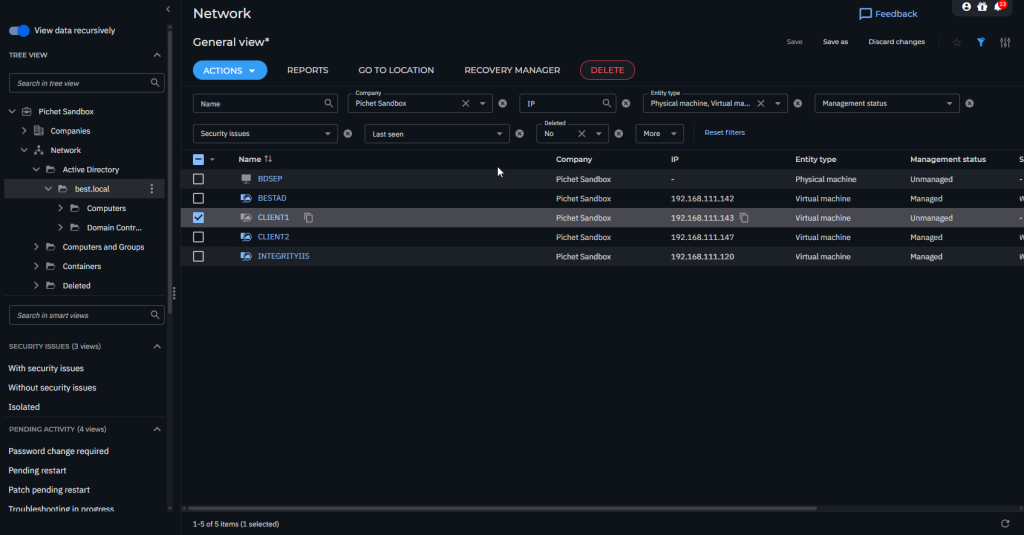
Bitdefender Endpoint Security Tools remote deployment

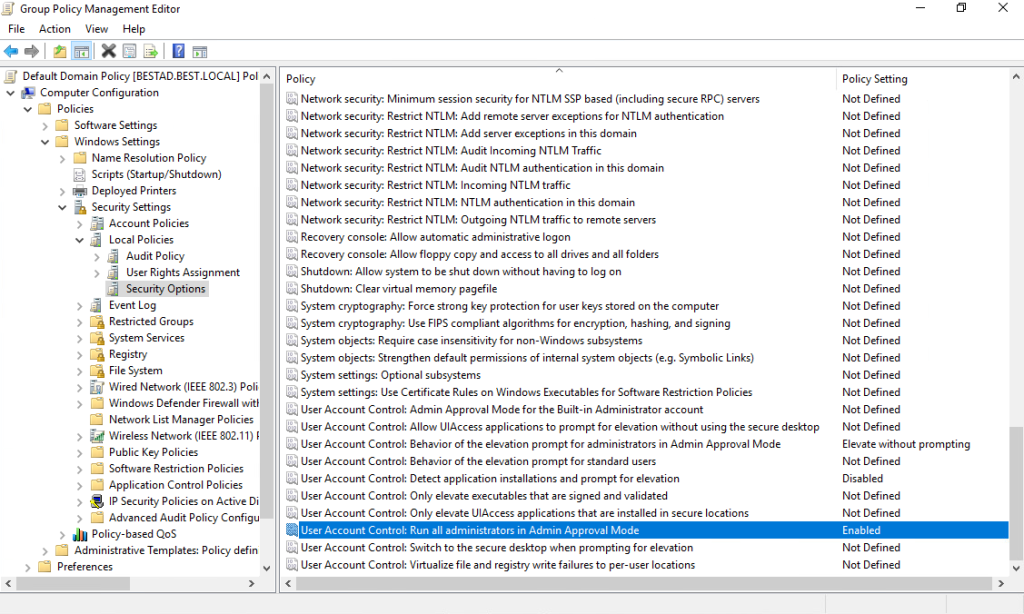
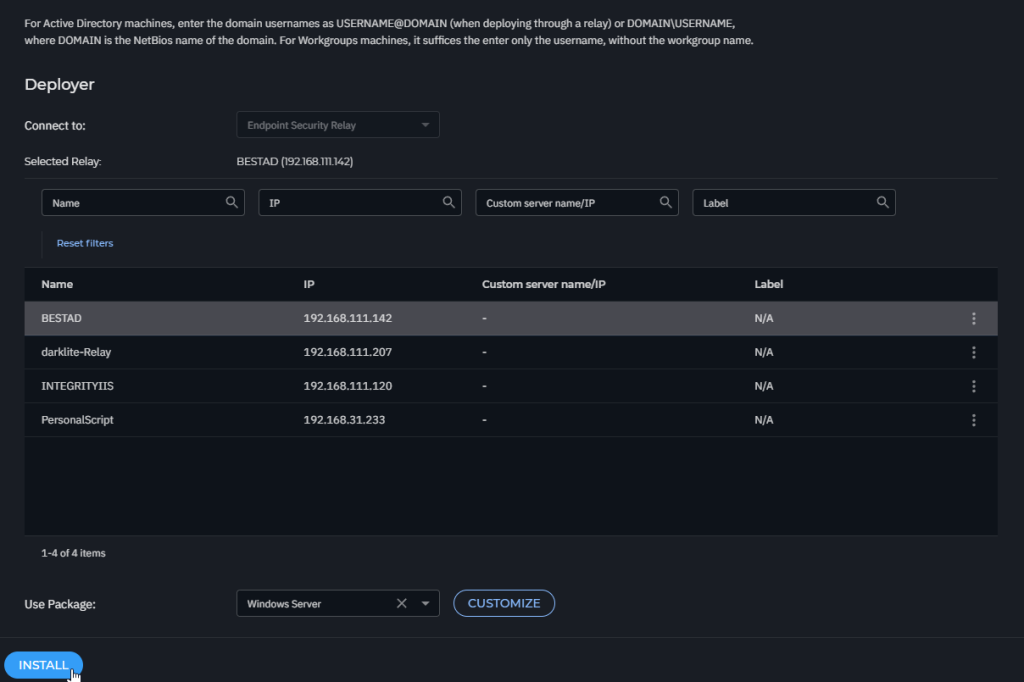
Setting this

https://www.bitdefender.com/business/support/en/77209-157498-install-security-agents—use-cases.html#UUID-ce63a5eb-e064-6715-2884-c2ca4377f3aa

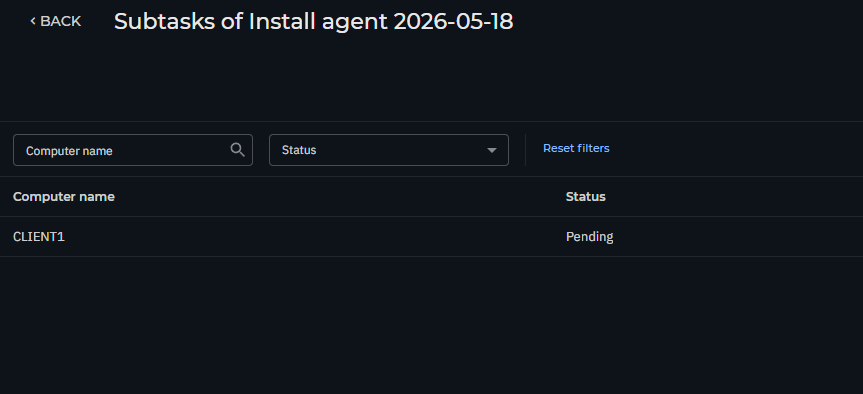
Then https://www.bitdefender.com/business/support/en/77209-157497-install-security-agents—standard-procedure.html#id337204

For Active Directory machines use these syntaxes: username@domain.com and domain\username. To make sure that entered credentials will work, add them in both forms (username@domain.com and domain\username).
Posted in Gravityzone | Tagged , , , , , , , | Leave a comment

Enable Excel Macro

Macro can be block by

Fileless Attack Defense if it trigger powershell.exe

Fix by

add command in Exclusions such as below command

"C:\Windows\System32\WindowsPowerShell\v1.0\powershell.exe" -ExecutionPolicy Bypass -WindowStyle Hidden -Command "Get-Process EXCEL .......... | Stop-Process -Force"
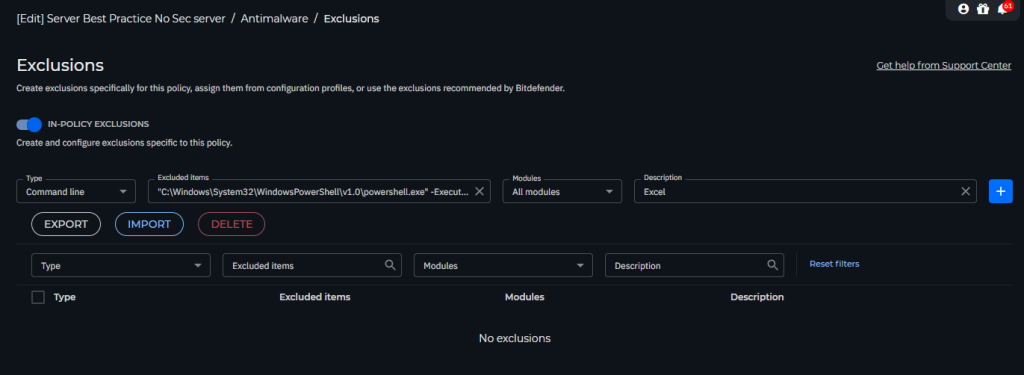
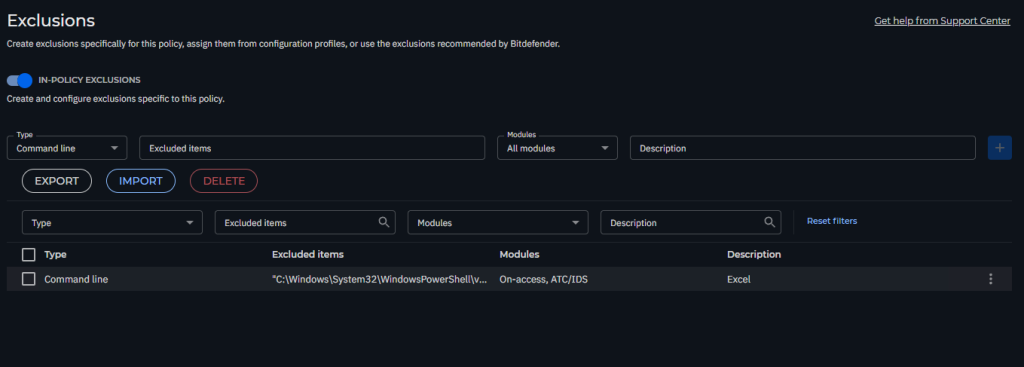
Then when it execute this command it will not blocked again.


Advance Anti Exploit

Fixed by


Go to Policy > Antimalware > Advance Anti-Exploit
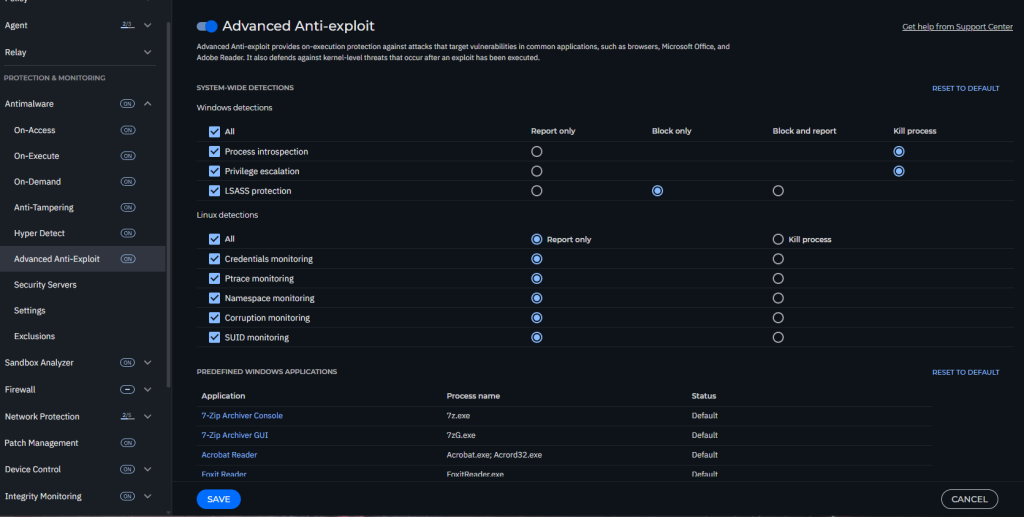
then Find

Microsoft Office, Microsoft ExcelExcel.exe

Add to report only for what it trigger in Incidents
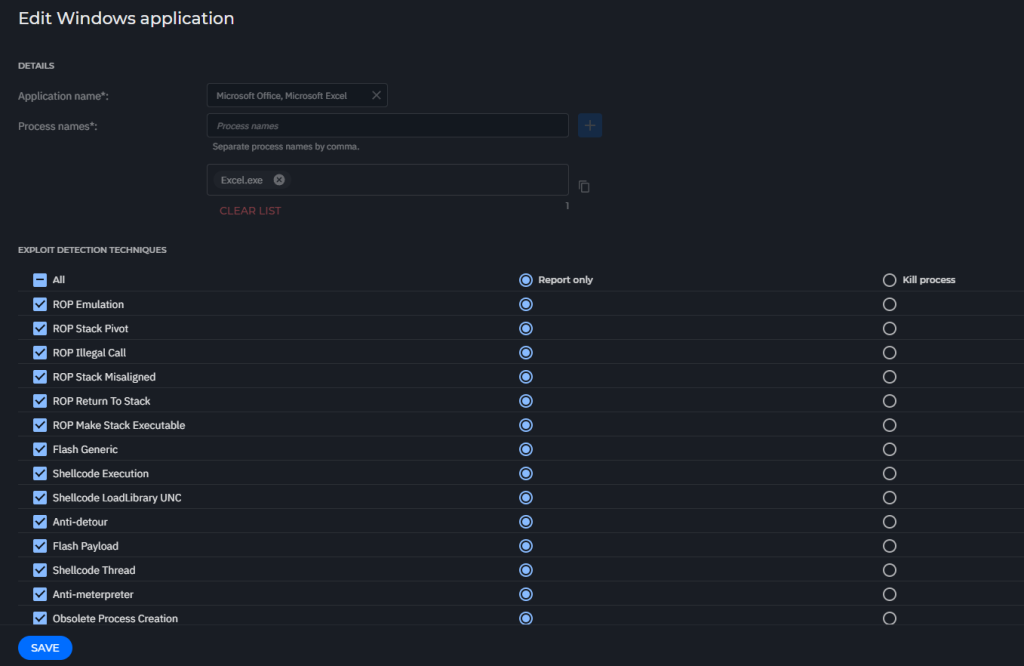
then save the policy
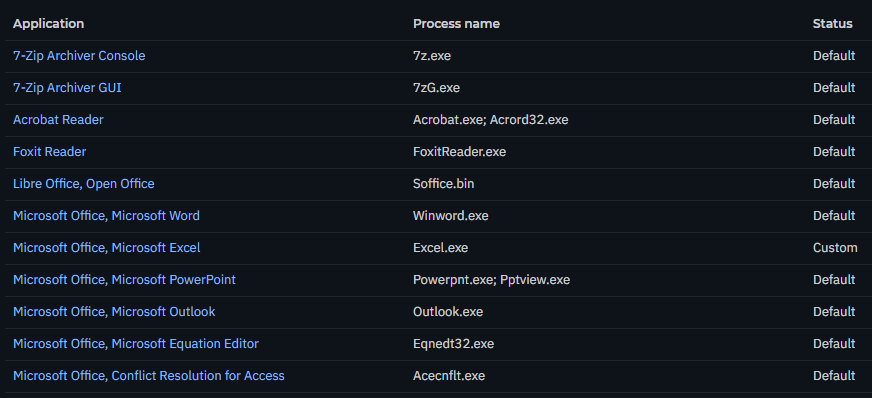
Posted in Gravityzone | Tagged , , , , , , | Leave a comment

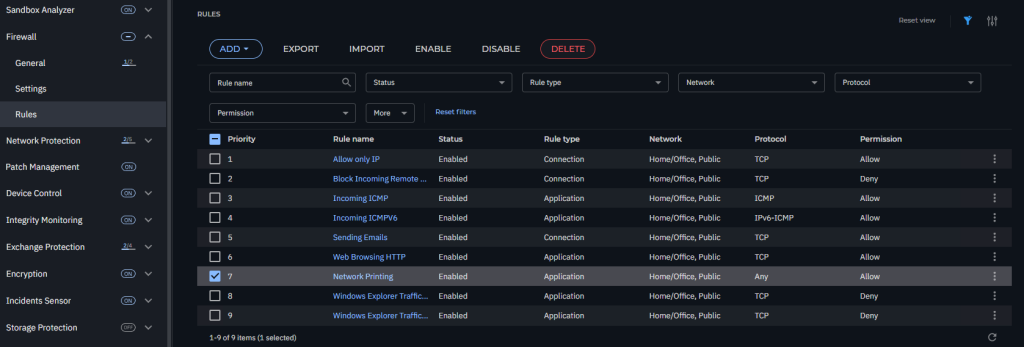
Enable Network Print

In Firewall > Rule

Edit rule > Allow
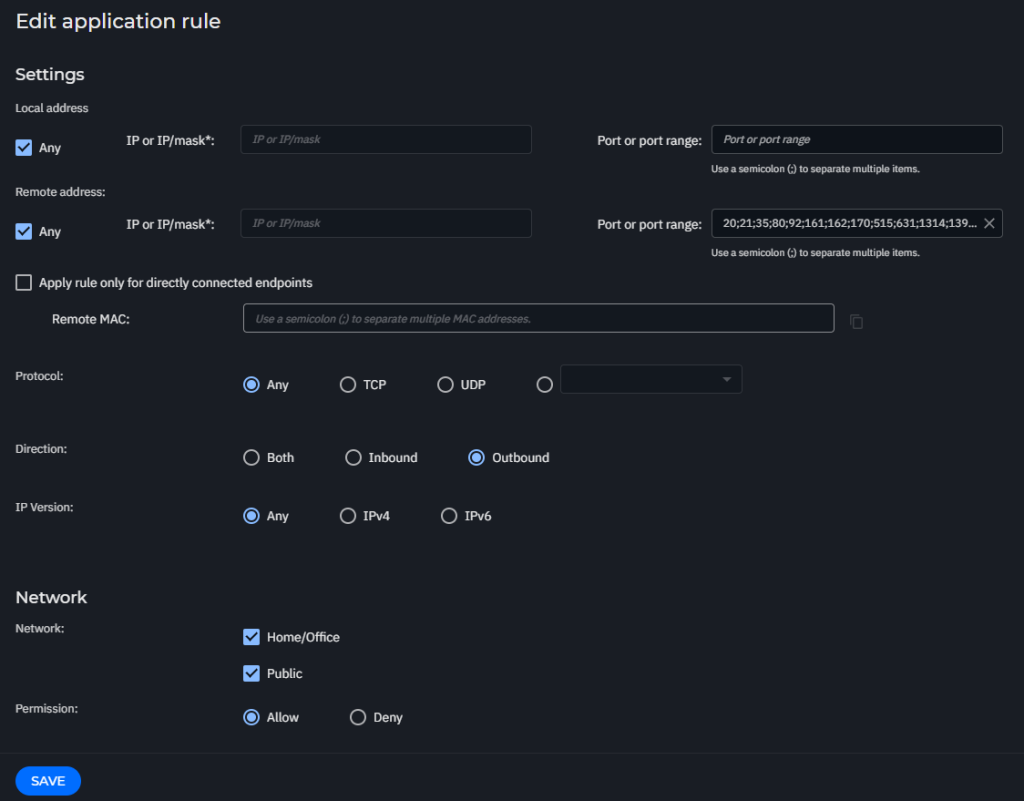
Enable Rule
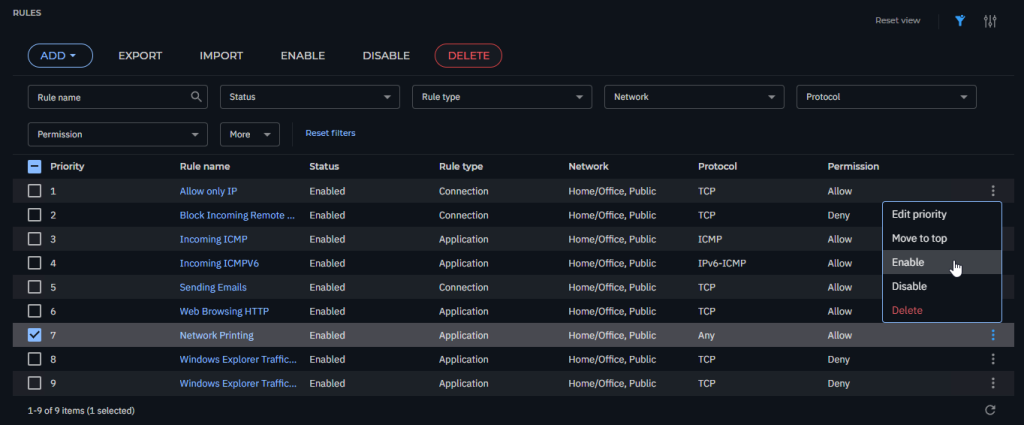
That it !!!

Posted in Gravityzone | Tagged , , , , | Leave a comment

Bitdefender EDR PoC Step

As I got Lots of request on How to PoC EDR

then this is my write up

we will use this Github to test


https://github.com/redcanaryco/invoke-atomicredteam/wiki/Installing-Invoke-AtomicRedTeam

First add exclusion on Gravityzone to C:\AtomicRedTeam


Open Powershell to create folder

mkdir C:\AtomicRedTeam
cd C:\AtomicRedTeam

Install module

Install-Module -Name invoke-atomicredteam,powershell-yaml -Scope CurrentUser

ANSWER Y
ANSWER A

Then download all test script

IEX (IWR 'https://raw.githubusercontent.com/redcanaryco/invoke-atomicredteam/master/install-atomicredteam.ps1' -UseBasicParsing);
Install-AtomicRedTeam -getAtomics


Checking script by

Invoke-AtomicTest All -ShowDetailsBrief
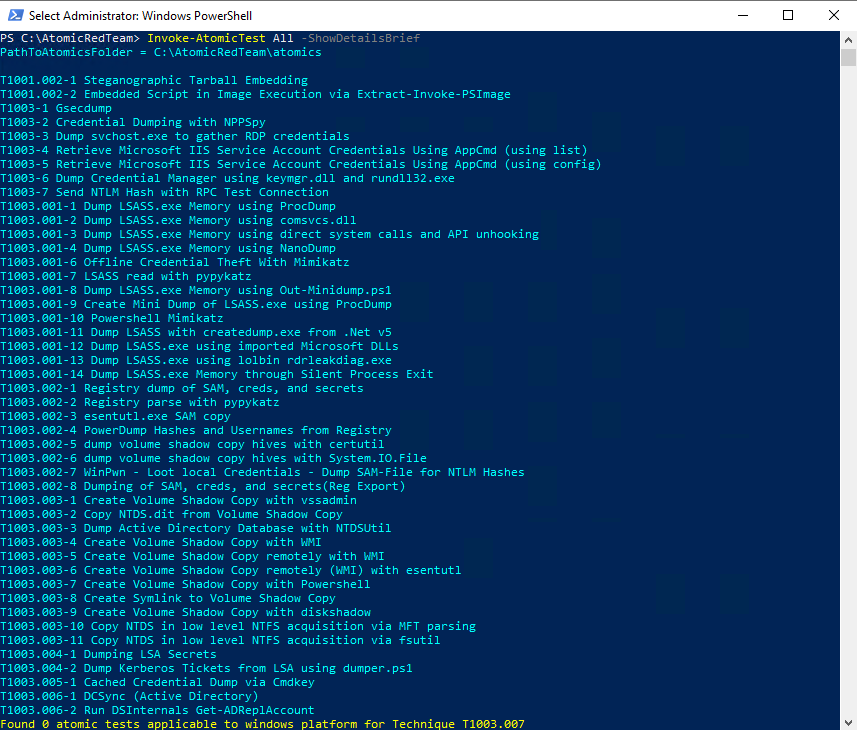
then

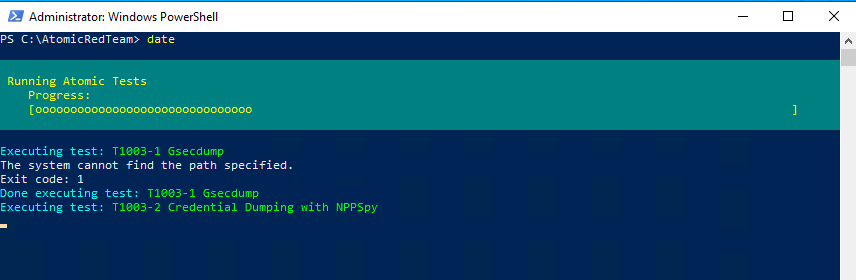
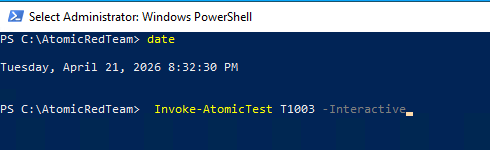
start test with to test all T1003 Interactively

Invoke-AtomicTest T1003 -Interactive

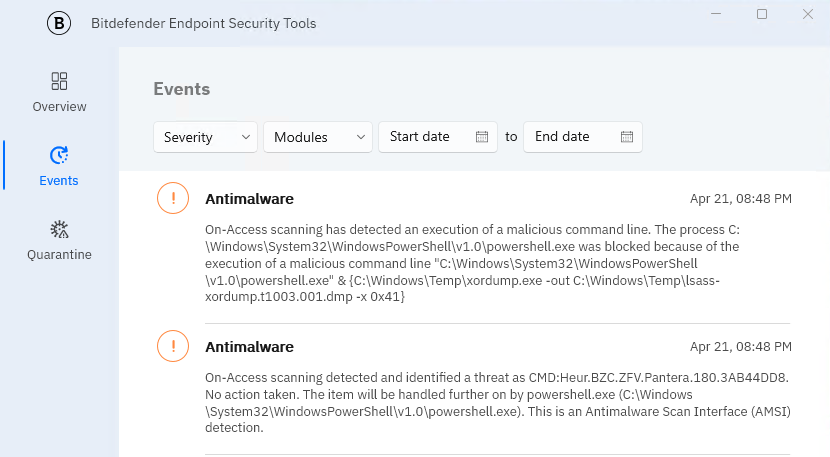
but you can see Bitdefender Agent Already block it
Invoke-AtomicTest T1003.001 -Interactive

Posted in Gravityzone | Tagged , , , , | Leave a comment

Install Bindefender Best Agent on Windows 7 Service Pack 1 and Windows 2008r2

Prerequisite For Windows 7 Service Pack 1

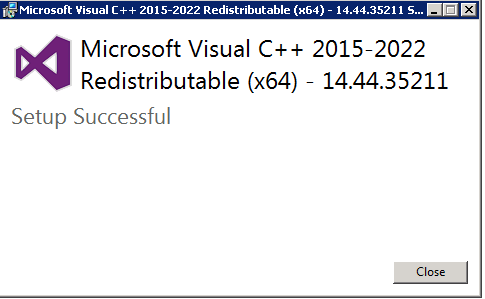
  • Latest Visual C++ Redistributable for Visual Studio 2015-2022

download here

https://learn.microsoft.com/en-us/cpp/windows/latest-supported-vc-redist?view=msvc-170#latest-supported-redistributable-version

or https://aka.ms/vs/17/release/vc_redist.x86.exe

/////////////////////////////////////////////////////////////////////////////////////////////////////////////
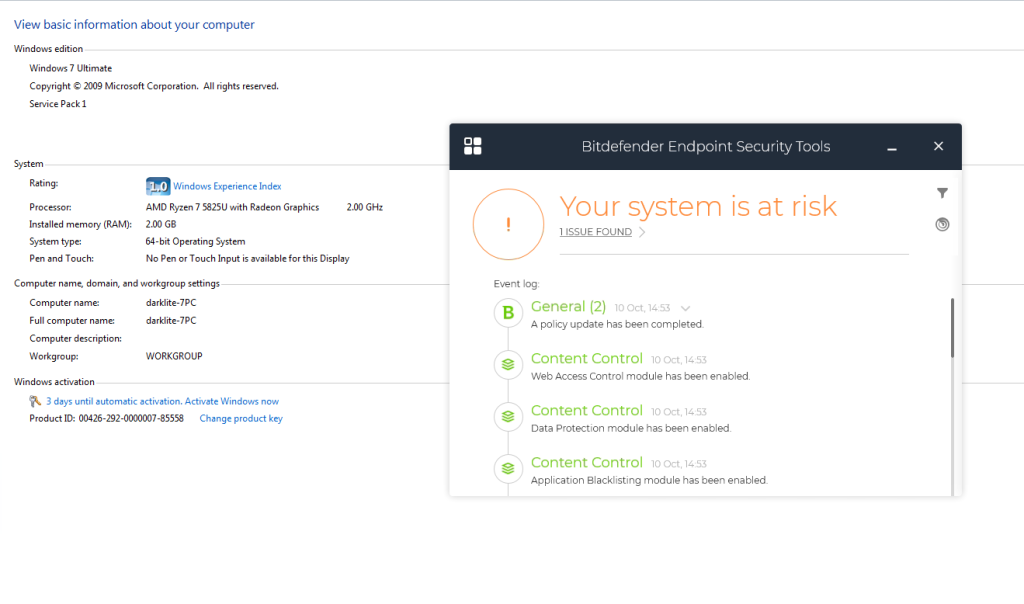
ONLY IF you are using Windows 7 need to install these patch
KB3033929
KB4490628
KB4474419
KB4536952
KB4534310
/////////////////////////////////////////////////////////////////////////////////////////////////////////////

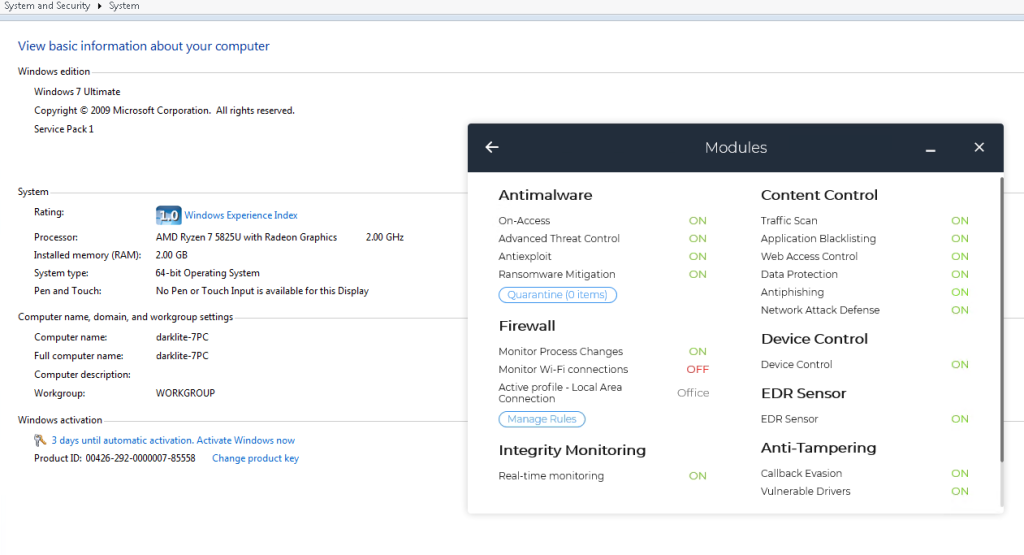
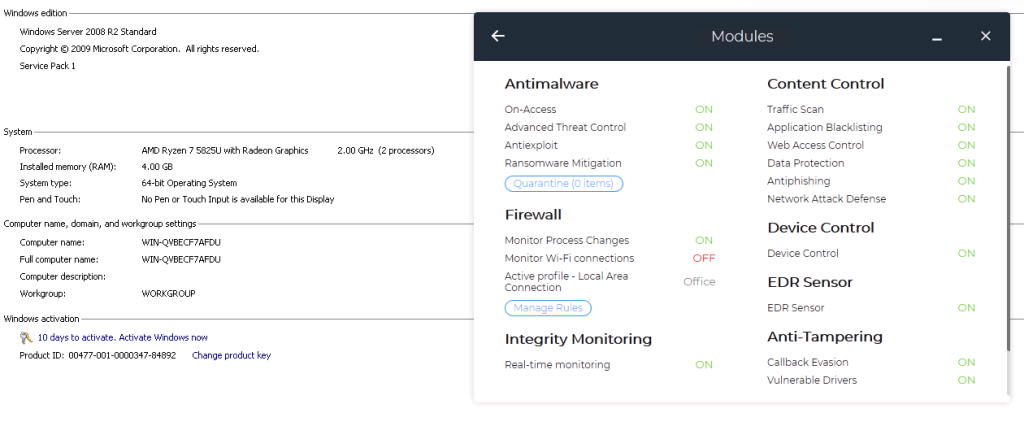
Prerequisite For Windows server 2008r2

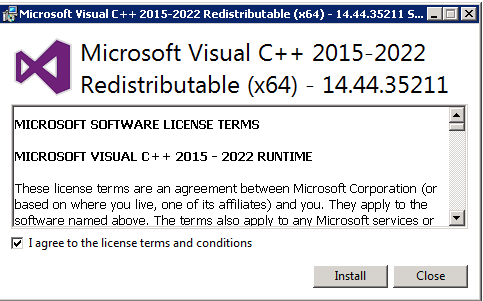
  • Visual C++ Redistributable for Visual Studio 2015-2022

https://learn.microsoft.com/en-us/cpp/windows/latest-supported-vc-redist?view=msvc-170#latest-supported-redistributable-version

or https://aka.ms/vc14/vc_redist.x64.exe
  • MicrosoftEasyFix51044

https://support.microsoft.com/en-us/topic/update-to-enable-tls-1-1-and-tls-1-2-as-default-secure-protocols-in-winhttp-in-windows-c4bd73d2-31d7-761e-0178-11268bb10392#bkmk_easy

https://download.microsoft.com/download/0/6/5/0658B1A7-6D2E-474F-BC2C-D69E5B9E9A68/MicrosoftEasyFix51044.msi

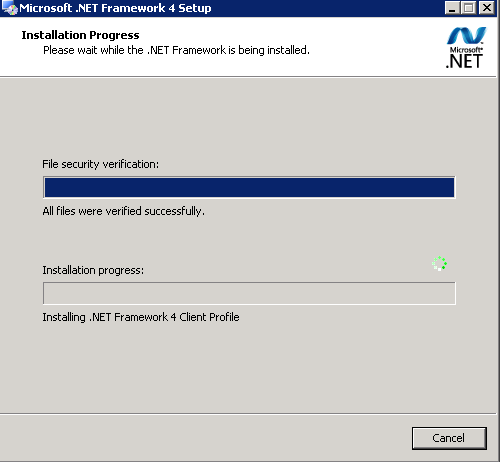
  • Microsoft .NET Framework 4 (Standalone Installer)

http://microsoft.com/en-us/download/details.aspx?id=17718

  • Security Update for Windows Server 2008 R2 x64 Edition (KB3033929)

https://www.microsoft.com/en-us/download/details.aspx?id=46083
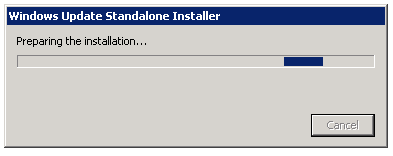
Or If you cannot download with that link you can check at github

https://github.com/darklite404/Bitdefender_Gravityzone/tree/main/Windows2008R2
Posted in Gravityzone | Tagged , , , , , , , , | Leave a comment

Connect Bitdefender CSPM+ with Jira and create ticket

1 Setting up an integration with Jira

To set up a Jira integration, follow these steps:
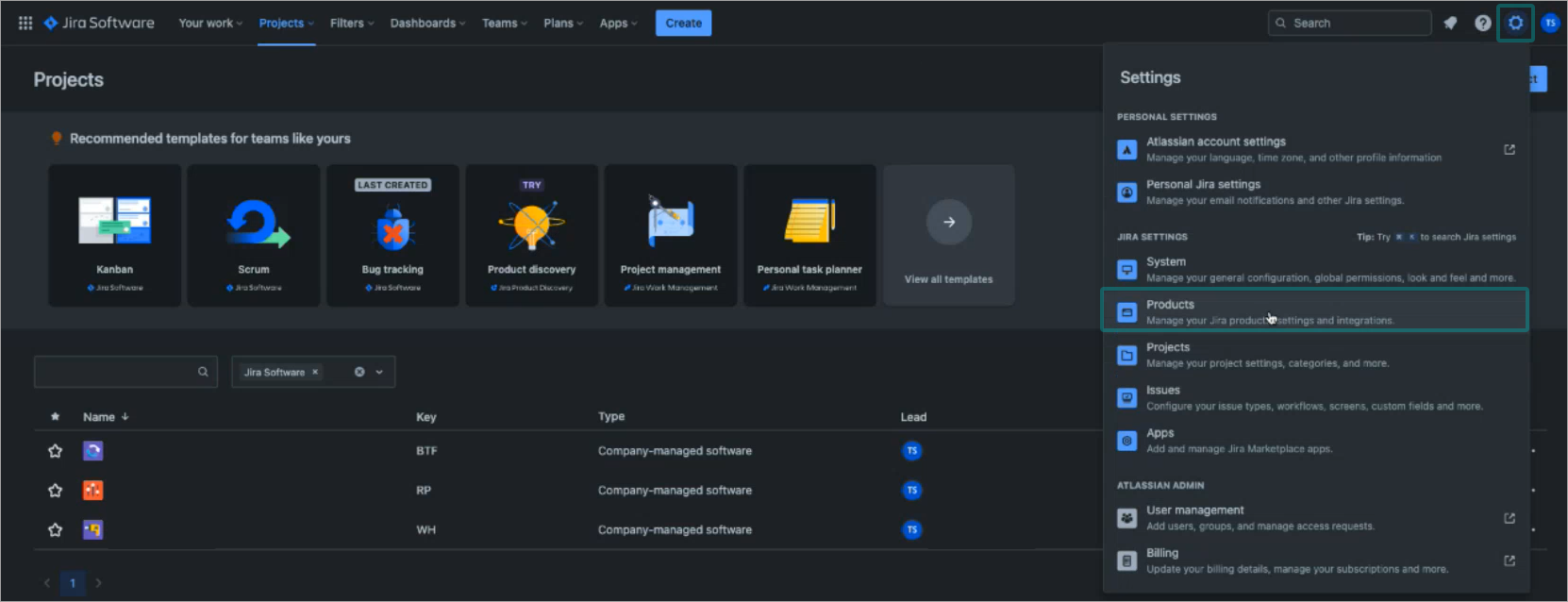
  1. Log in to Jira with an account that has access to your organization Settings page.
  2. Click the Settings button on the upper right side of the page and select Products:CSPM_integrations_Jira_1_453817_en.pngThe Jira Software configuration page is displayed.
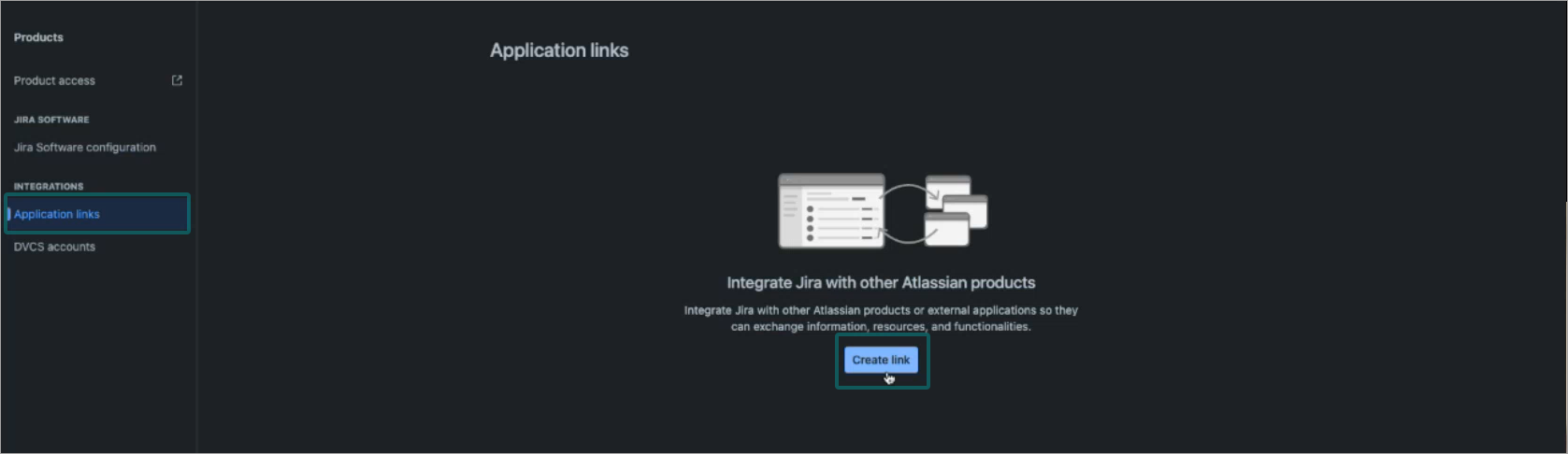
  3. Click the Applications links link from the menu on the left side of the page. 
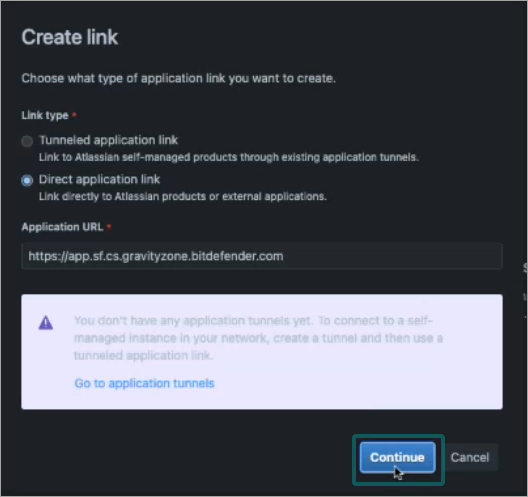
  4. Click the Create link button:CSPM_integrations_Jira_2_453817_en.pngThe Create link window is displayed.
  5. Under Link type, make sure the Direct application link is selected.
  6. Open a new browser tab and log in to your Cloud Security console.
  7. Copy the first part of the URL, starting from https and up to gravityzone.bitdefender.com:CSPM_integrations_Jira_4_453817_en.png
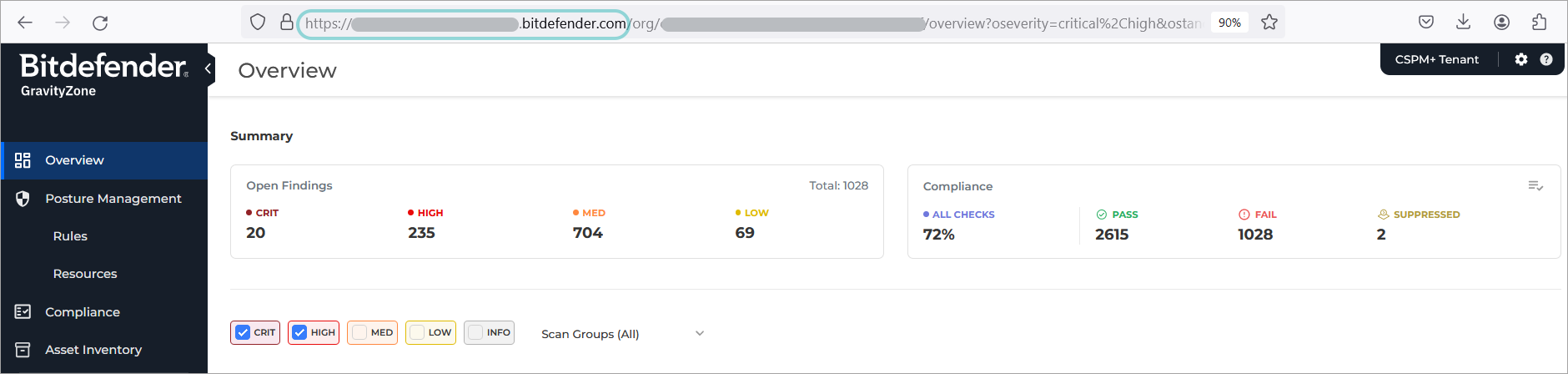
  8. Go back to the browser tab with Jira and paste the URL into the Application URL field.
  9. Click ContinueCSPM_integrations_Jira_3_453817_en.png
  10. In the Configure Application URL window, the new URL field will be auto filled with the URL you entered in the previous step. 
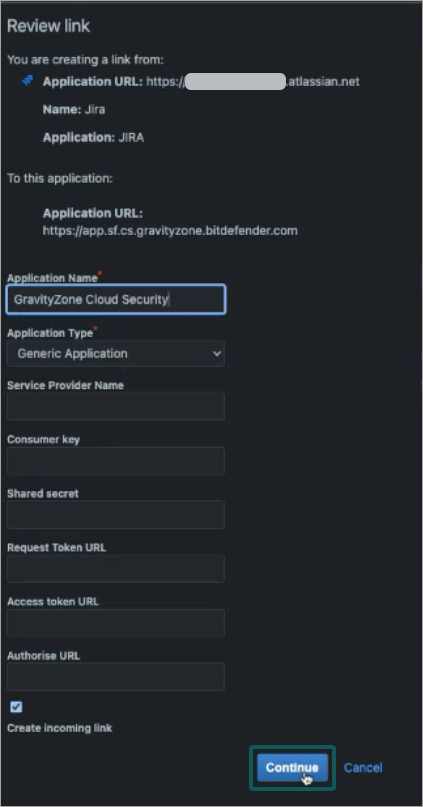
  11. Click Continue. The Review link window is displayed.
  12. Fill in the following information:
    • Under Application Name, type in a descriptive name, such as GravityZone Cloud Security.
    • Under Application Type, select Generic Application.
    • Select the Create incoming link checkbox.
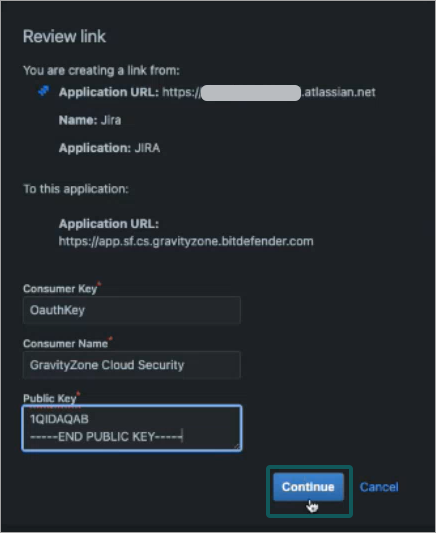
  13. Click Continue.CSPM_integrations_Jira_5_453817_en.pngAdditional information is displayed under the Review link window.
  14. Fill in the following information:
    • Under Consumer Key, type in OauthKey.
    • In the Consumer Name field type in a descriptive name, such as GravityZone Cloud Security.
    • Copy the below code and paste it under Public Key—–BEGIN PUBLIC KEY—– MIIBIjANBgkqhkiG9w0BAQEFAAOCAQ8AMIIBCgKCAQEAsrt+7VobIBFZE6fK9Ikd hEZBFUSzB3i41j/ MftDJwyC4YlNIvQIyhMR1ViRpxQFQiQFp7P9FlDLsezrDJu+E m7Z+VJFLcnOHoOm4EAcyjlMbUb87YPYp0SbvxxVnhbpQ4EOIr//gMO/ +yjyh6lVc i3uy+B7MFFlF247fhnpQOWthI5dK6C44Y66YSzAEPHHMVDyRYPciuajSdodSr71s h/ 0nuF5jy0jv48qzfZVKw3w258JvXmx8V+ia5MxlYAfDN9vVX0Gb0oFOzfqr/ qDxOfyBYoV3NcURgCj1EA0V/ADsFS+BVWB5fs8Bs1kLREsPjmOlI6A4PRiRFKiGyuLM 1QIDAQAB —–END PUBLIC KEY—– 
  15. Click Continue:CSPM_integrations_Jira_6_453817_en.pngThe Application links page is displayed, along with a new entry, if the creation of the entry has been successful.
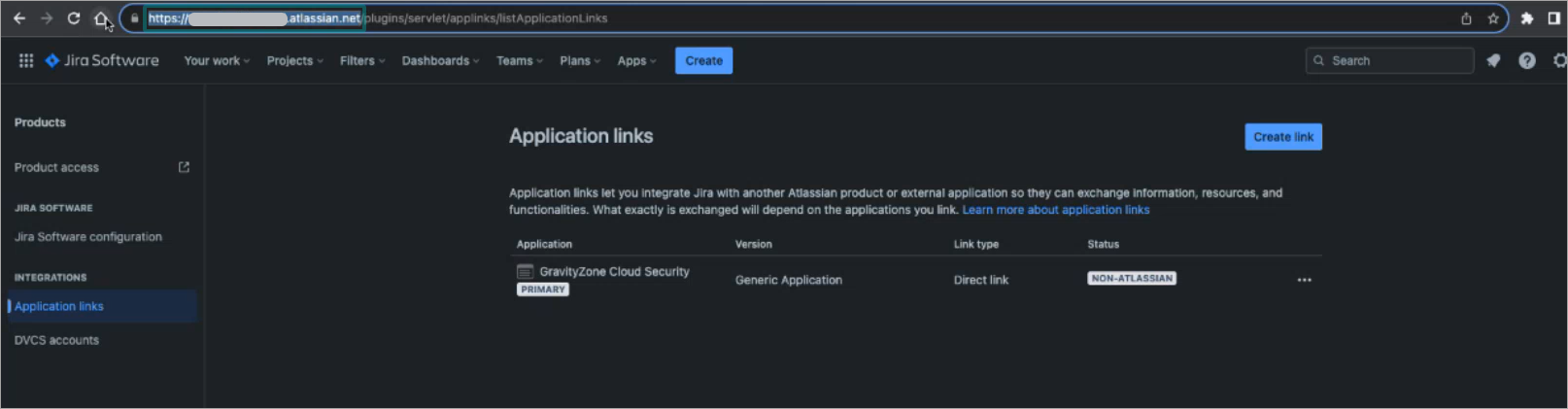
  16. Copy the first part of the URL, starting from https and up to atlassian.net:CSPM_integrations_Jira_7_453817_en.png
  17. Go back to the Cloud Security console browser tab.
  18. Go to the Integrations page.
  19. Under the Task Management section, click the Add button for the Jira integration:CSPM_integrations_Jira_8_453817_en.pngThe Add Jira integration window is displayed.
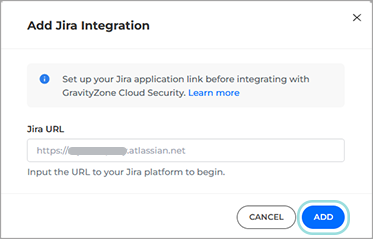
  20. Paste the URL you copied in step 16 in the Jira URL field.
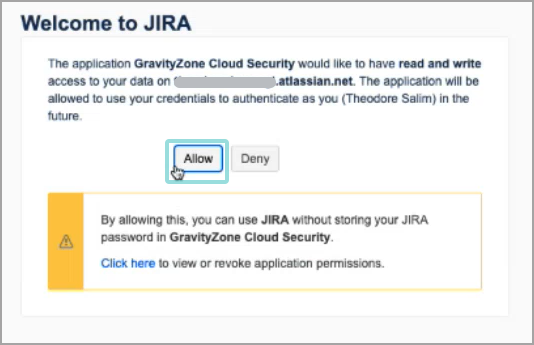
  21. Click Add:CSPM_integrations_Jira_9_453817_en.pngWelcome to Jira window appears.
  22. Click Allow to finish the integration.CSPM_integrations_Jira_10_453817_en_copy.png

The integration is now complete.

The No connection status is no longer showing under Jira, and today’s date is displayed under the Integration date column.

2 Creating a Jira ticket from a finding

To automatically generate a Jira ticket from a finding, follow the steps below:

Note

To use this feature you require an active Jira integration.

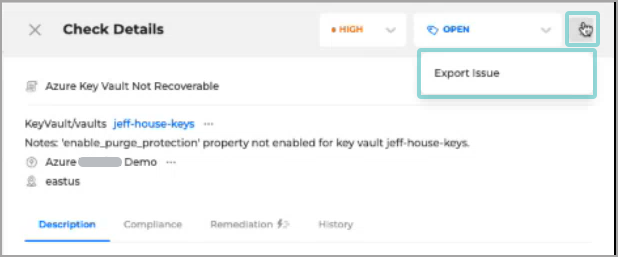
  1. Open the Check Details panel for the finding you want to export.
  2. Click the Export Screen_Shot_2023-10-14_at_6_07_31_PM.png button on the upper right side of the panel and select Export issue:CSPM_export_to_Jira_454168_en.pngThe Export Finding page is displayed.
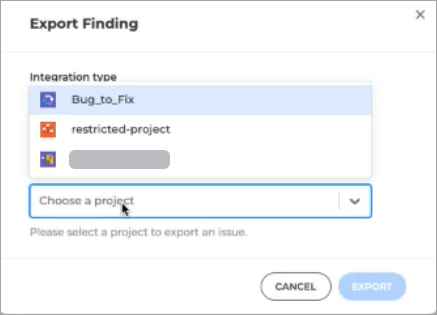
  3. Click the Choose a project drop-down menu and select the project where you want to create the request:CSPM_export_to_Jira_2_454168_en.png
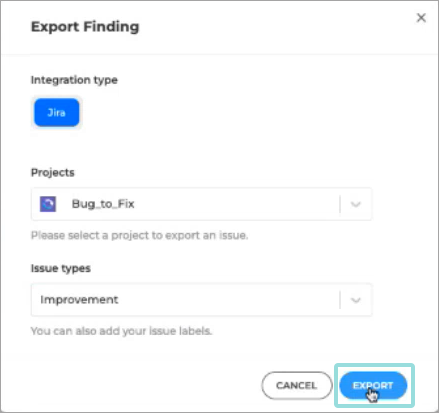
  4. Select the type of issue you want to create.
  5. Click ExportCSPM_export_to_Jira_3_454168_en.png

A new Jira ticket containing all the information present in the finiding is created.

Ref :

1 https://www.bitdefender.com/business/support/en/77209-453877-setting-up-an-integration-with-jira.html

2 https://www.bitdefender.com/business/support/en/77209-454208-creating-a-jira-ticket-from-a-finding.html

Posted in CSPM+, Gravityzone | Tagged , , , , | Leave a comment

Gravityzone Policy Best Practices for Client/Server

For EPP/EDR

https://techzone.bitdefender.com/en/tech-papers/gravityzone-best-practices.html

Agent

General settings within the policy allow you to manage user interface display options, password protection, proxy settings, power user settings, communication options, and update preferences for the selected endpoints.

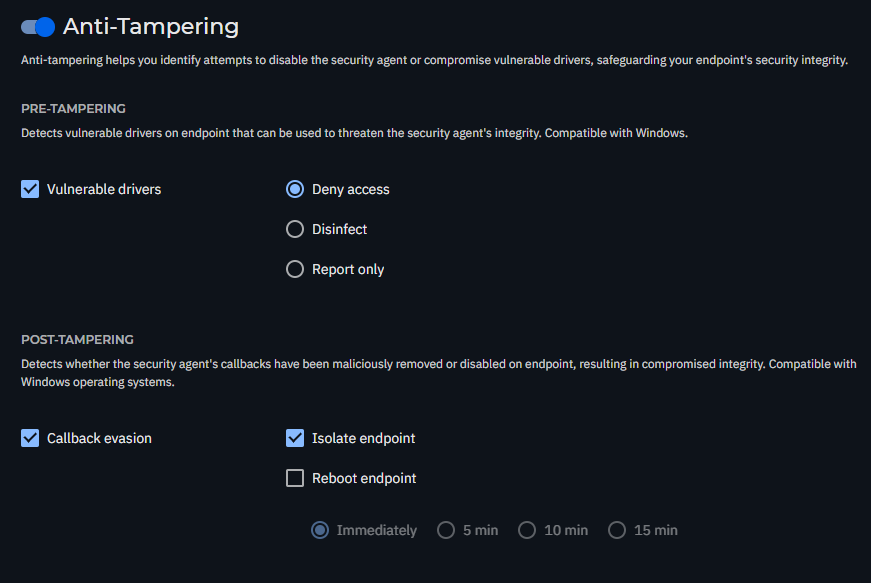
Set uninstall password: This prevents users with administrative rights from unauthorized uninstalling the BEST agent. This uninstall password, however, won’t stop advanced threat actors, who use more advanced tampering techniques. To configure Anti-Tampering protection, navigate here.

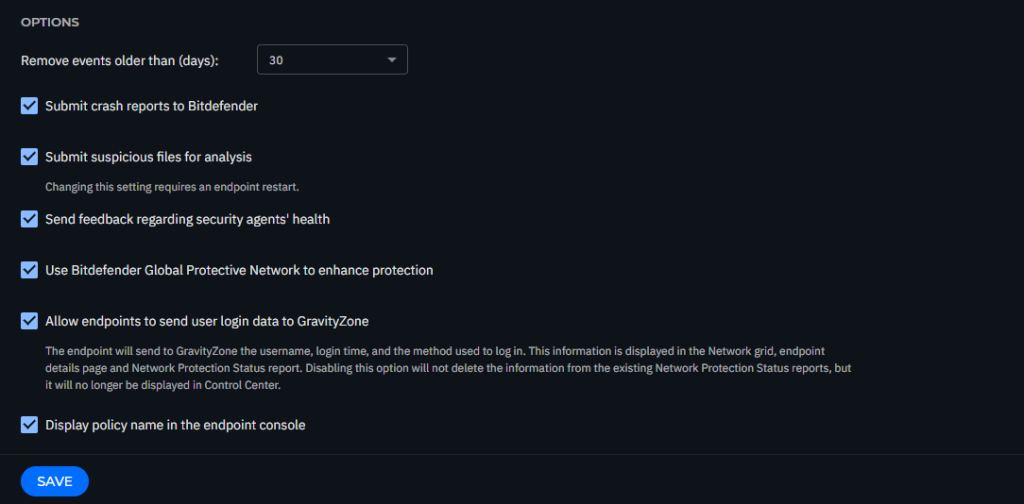
Allow endpoints to send user login data to GravityZone: Enable this option to see the logged-in user on their machines within the Network section.
Update

Navigate to the Agent > Update section to configure the BEST agent and security content update settings.

We recommend configuring the following:

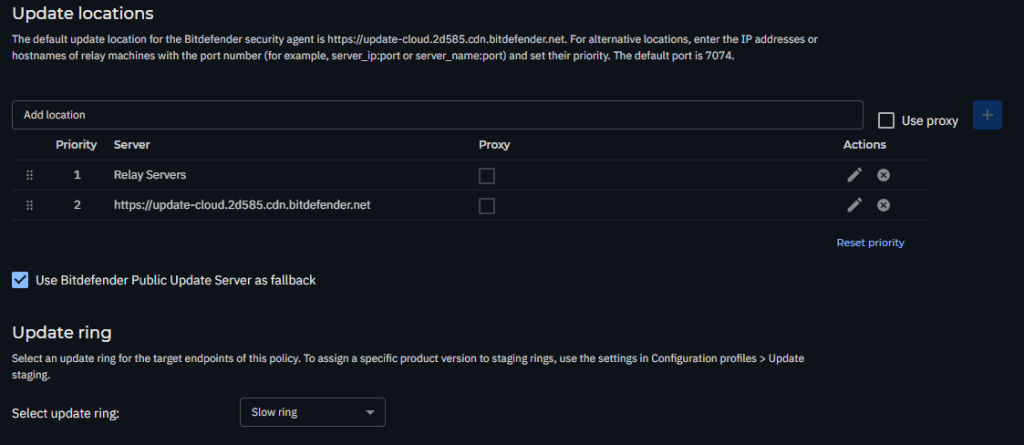
  • Product Update: Set a one-hour update interval. For non-persistent VDIs, disable product updates to avoid frequent reinstalls.
  • Security Content Update: Set a one-hour update interval to ensure endpoints are always protected with the latest security definitions.
  • Update Ring: The update ring should be configured to use the Slow ring for stable, well-tested updates. However, for larger organizations that have a staging or testing environment, the Fast ring can be used to identify any potential issues with new updates before they are deployed broadly across your production endpoints.

Antimalware

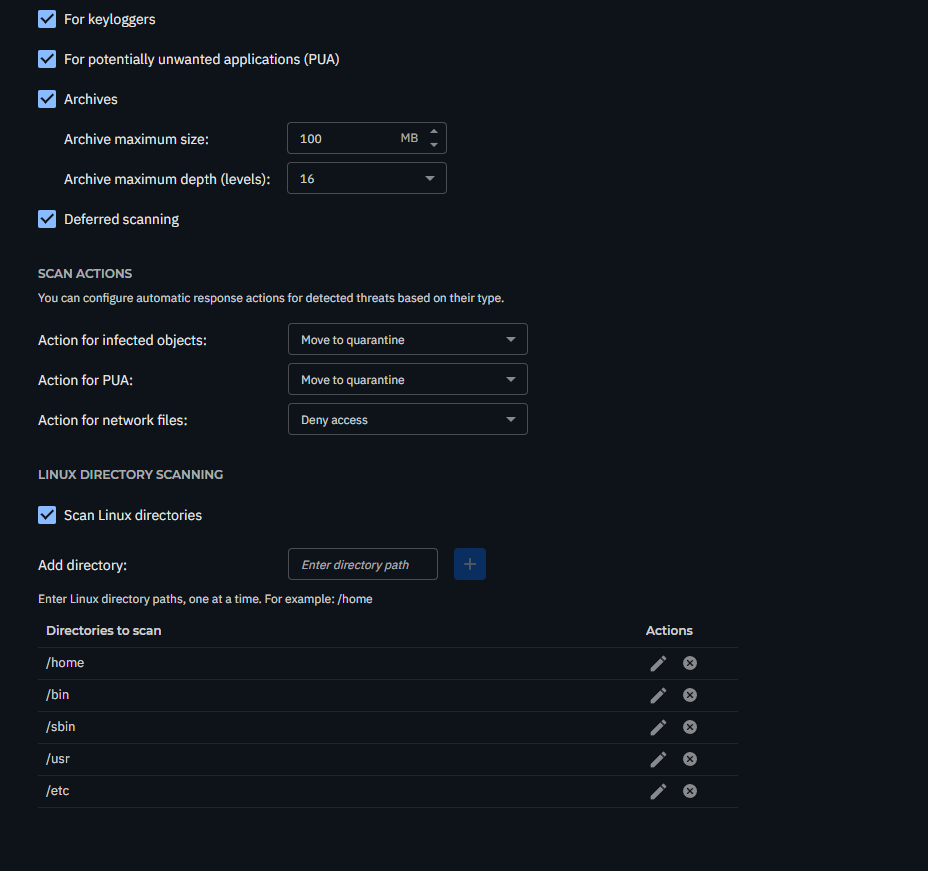
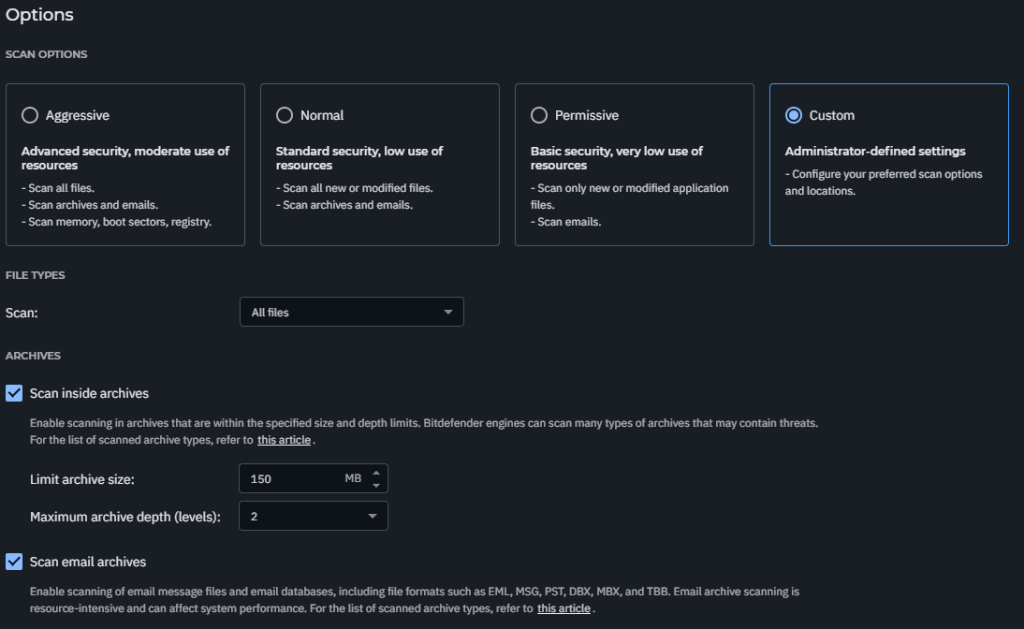
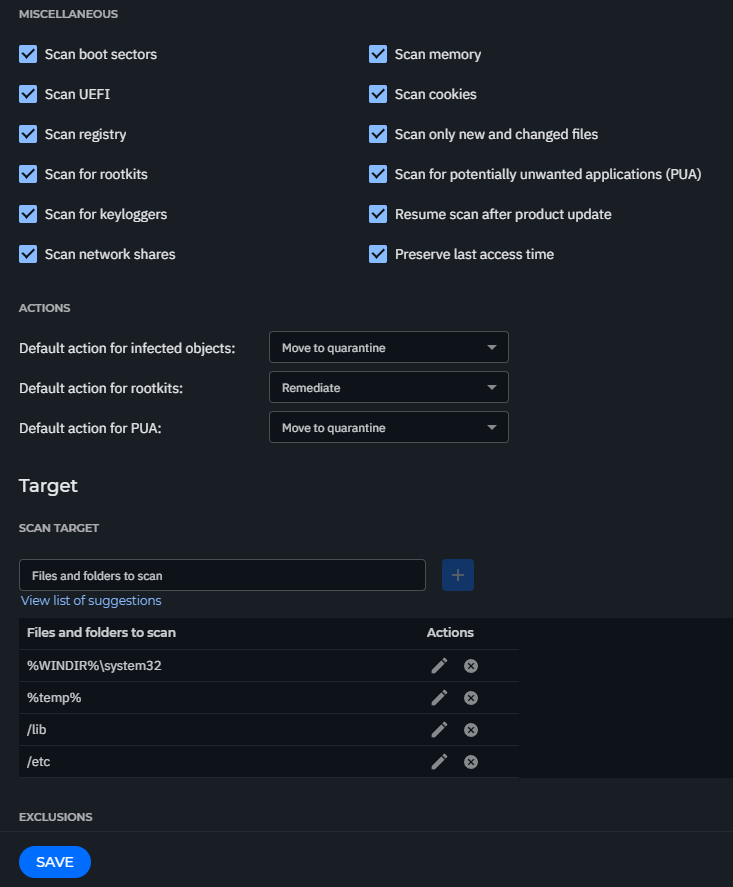
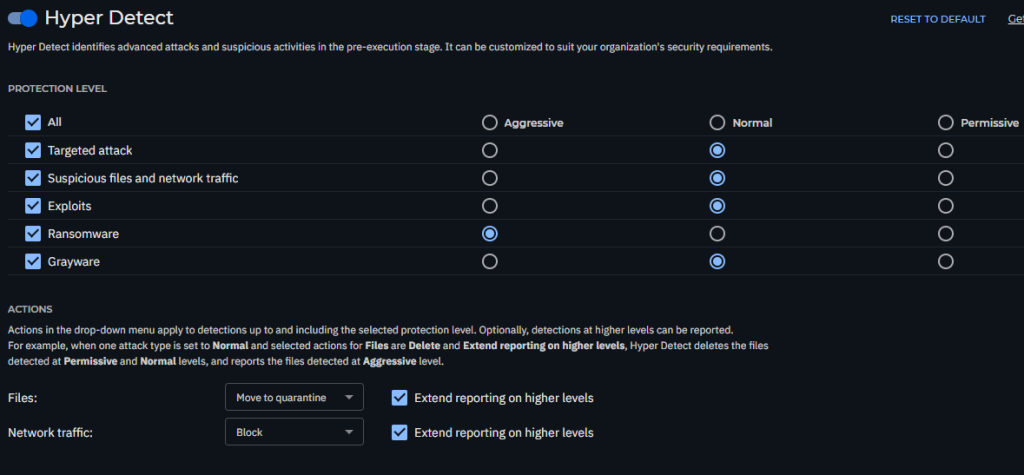
The Antimalware module is the foundation of your BEST, providing a multi-layered defense that proactively protects against a wide range of threats, from traditional malware to advanced, fileless attacks and ransomware. This section details the configuration for key settings, including On-Access, On-Execute, On-Demand, Anti-Tampering, HyperDetect, and Advanced Anti-Exploit.

On-Access Scanning

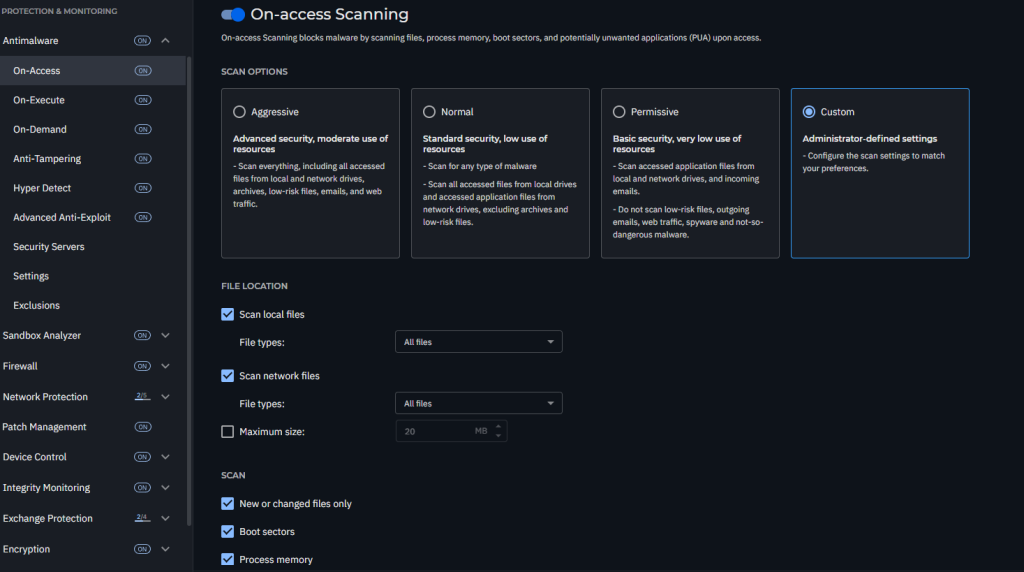
Malware protection prevents new malware threats from entering the system by scanning local and network files when they are accessed (opened, moved, copied, or executed). Navigate to Antimalware > On-Access to configure antimalware protection.
On-Execute Scanning

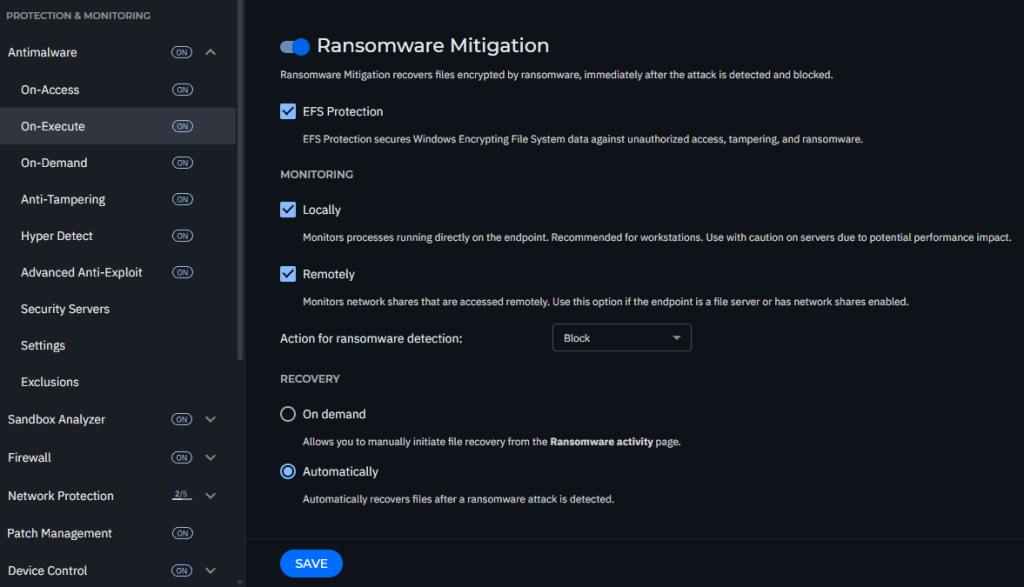
On-Execute Scanning protects against malicious processes during their execution stage. Navigate to Antimalware > On-Execute to configure this layer of protection.

Advanced Threat Control (ATC)
Sensitivity: Set Normal scan sensitivity for workstations and Aggressive for servers.

On-Demand Scanning

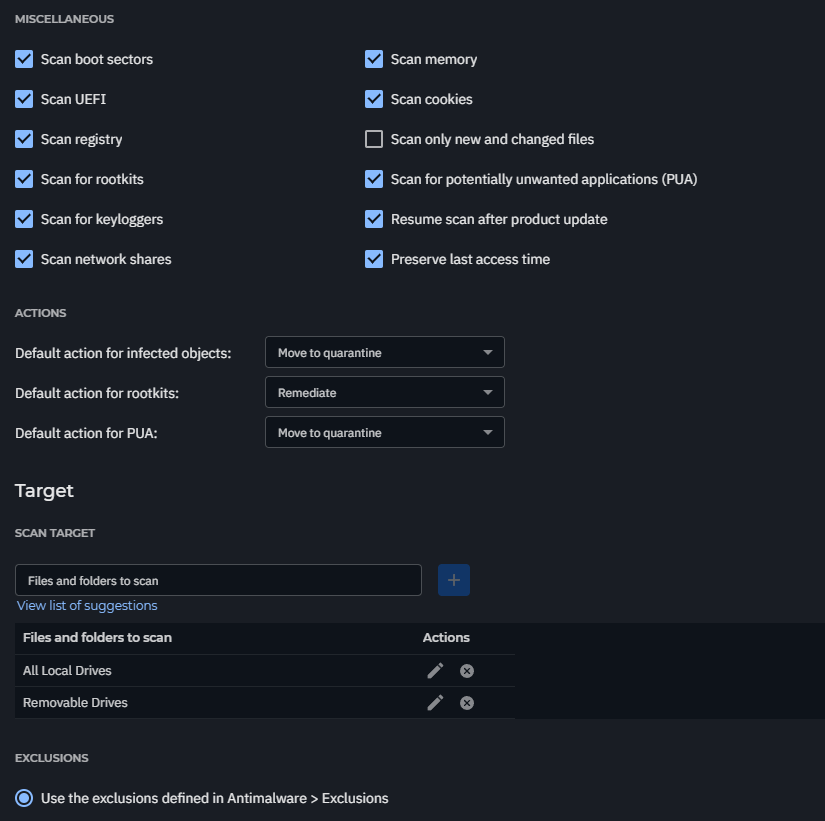
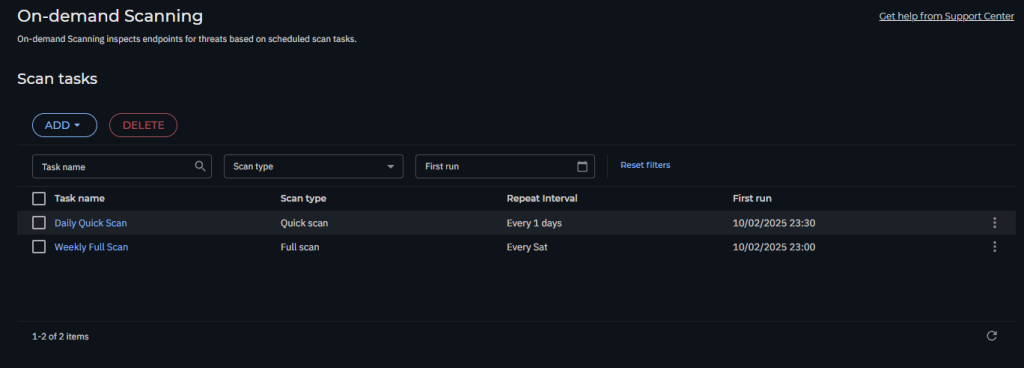
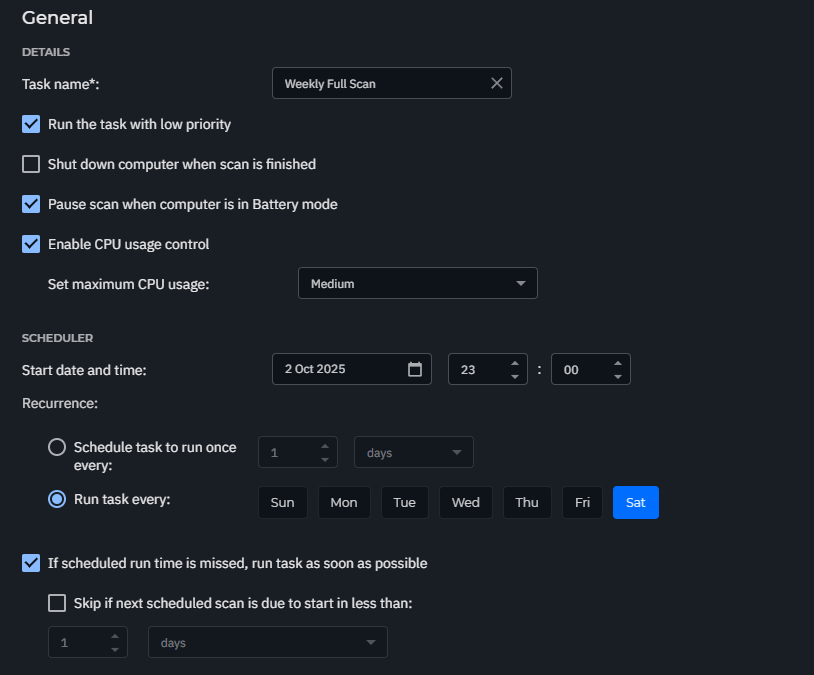
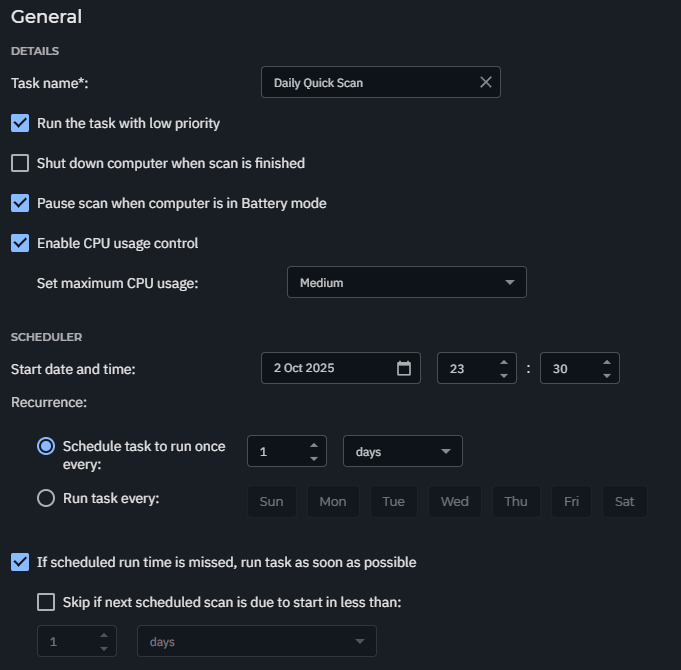
We recommend two types of regular scanning: a weekly full scan and a daily quick scan.
Weekly Full Scan
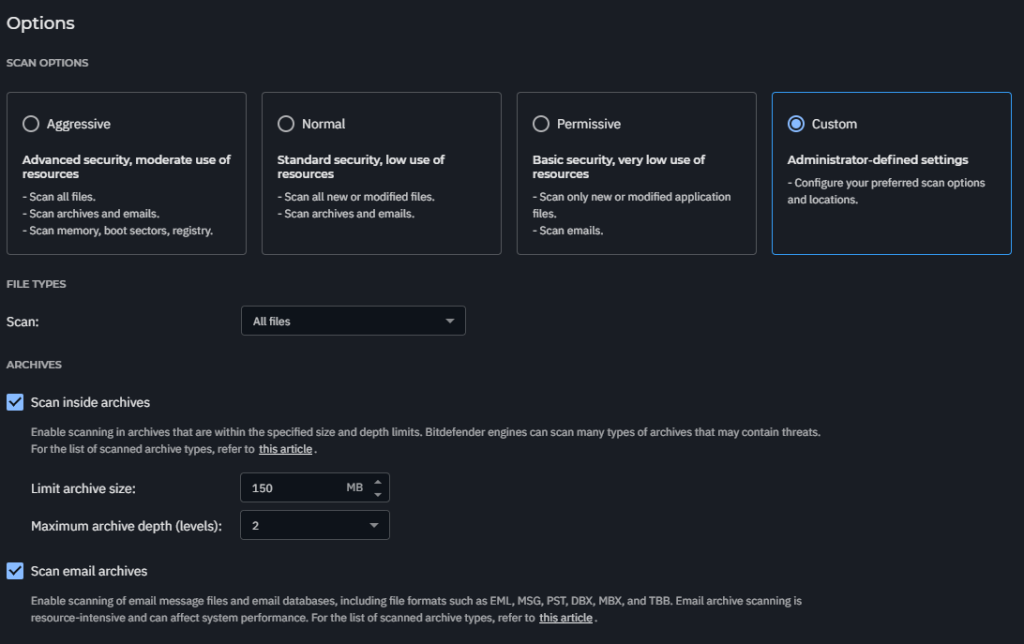
Daily Quick Scan
Anti-Tampering

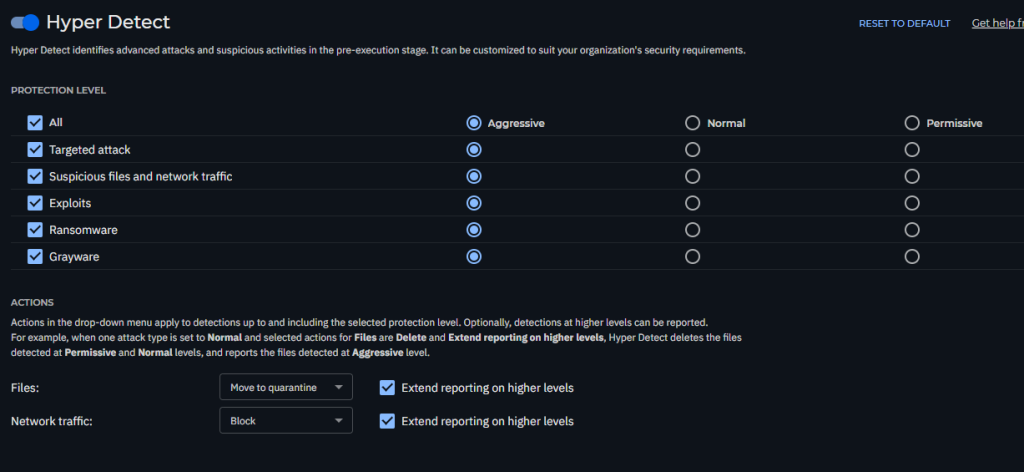
Hyper Detect

For client

For Server

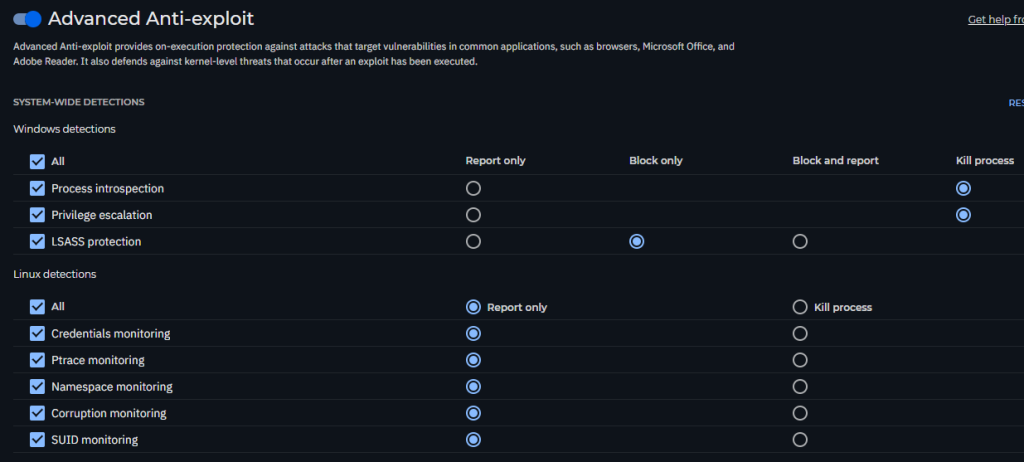
Advanced Anti-Exploit

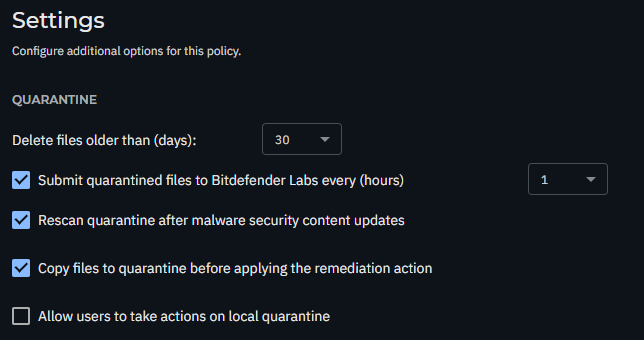
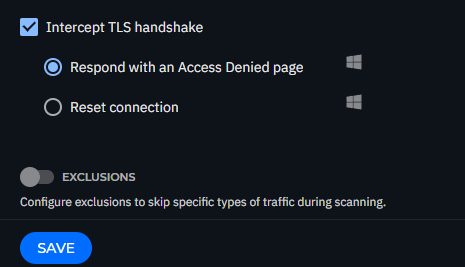
Settings

Exclusions

Recommended vendor and product exclusions – Enable this option to use default exclusions provided by Bitdefender for compatibility with common third-party software.

Sandbox Analyzer

Analysis modeBlocking: Endpoint Users will have no access to the file until the analysis result is returned to the endpoint from the Sandbox Analyzer.
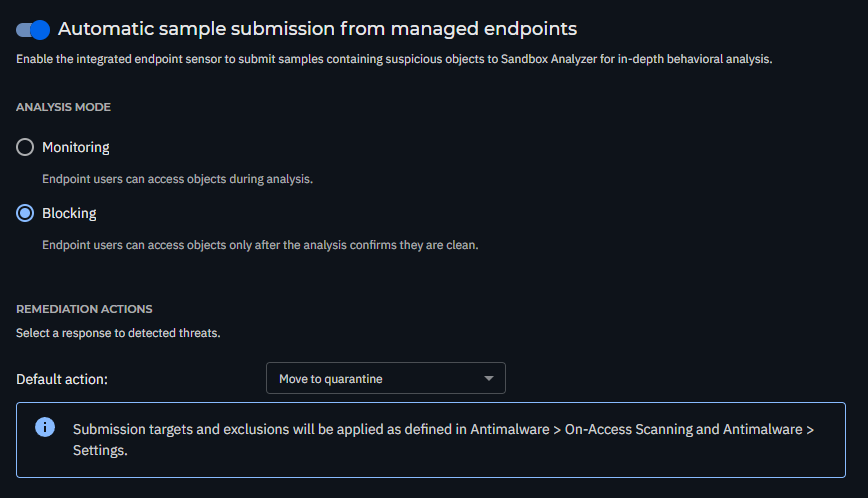
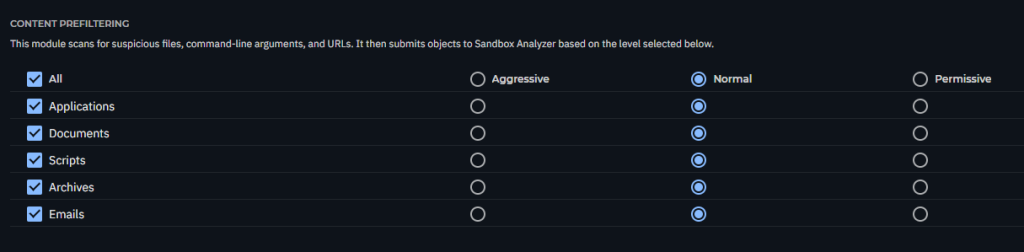
* The Bitdefender MDR Cybersecurity Breach Warranty requires Content Prefiltering settings to be configured in Aggressive mode.
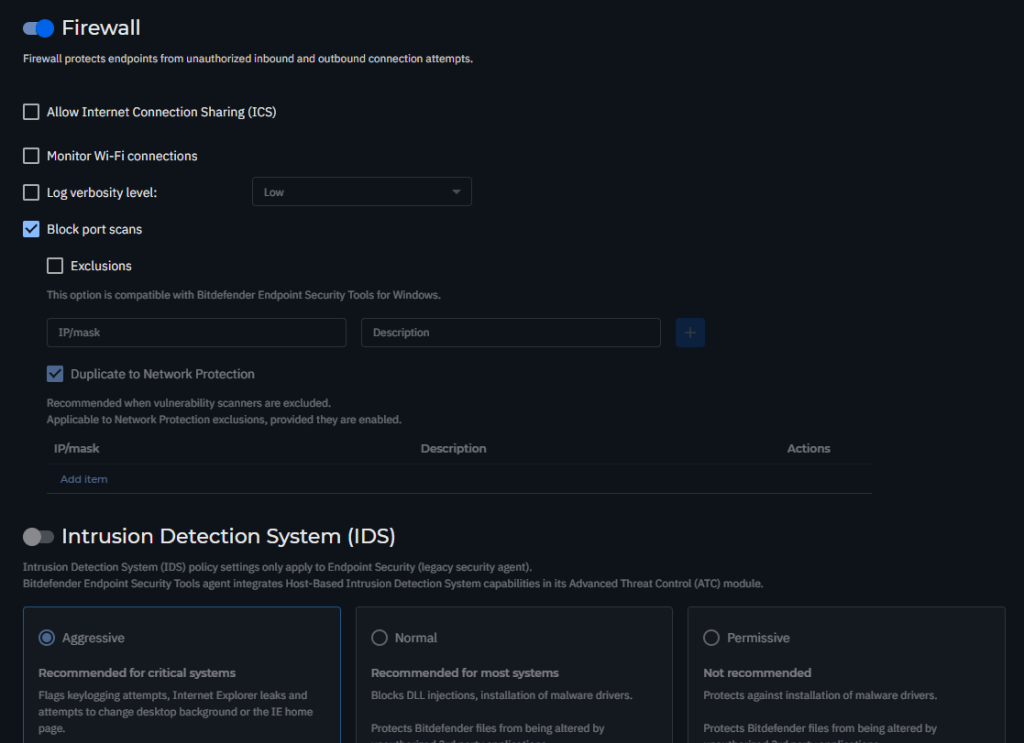
Firewall

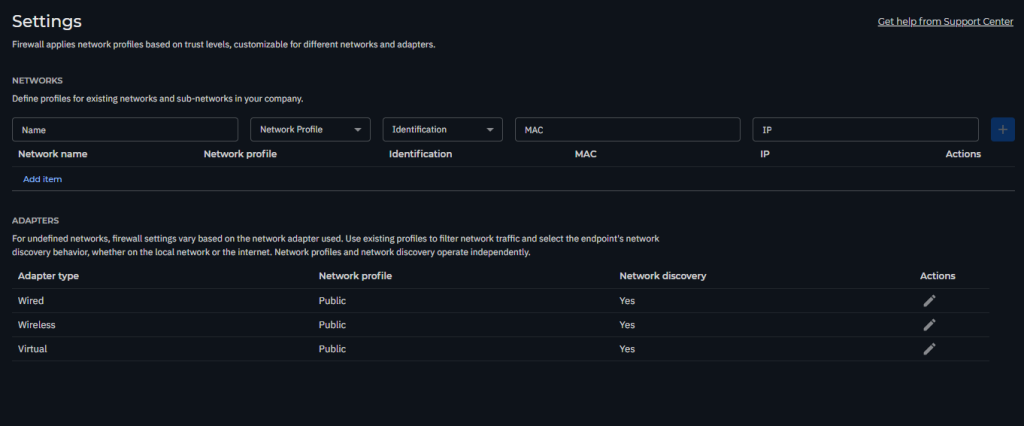
Settings

The firewall’s filtering policy depends on the trust level. To apply different profiles to network segments within your company, we recommend applying network profiles to your company’s managed networks in the Networks table:

  • Trusted: Disables the firewall for respective adapters. The traffic is allowed and not filtered.
  • Home/Office: Allows all traffic to and from computers in the local network while the other traffic is being filtered.
  • Public: All traffic is filtered.
  • Untrusted: Completely blocks network and Internet traffic through the respective adapters.

If a network that is not defined is detected, the Bitdefender security agent identifies the network adapter type and applies a corresponding profile to the connection.
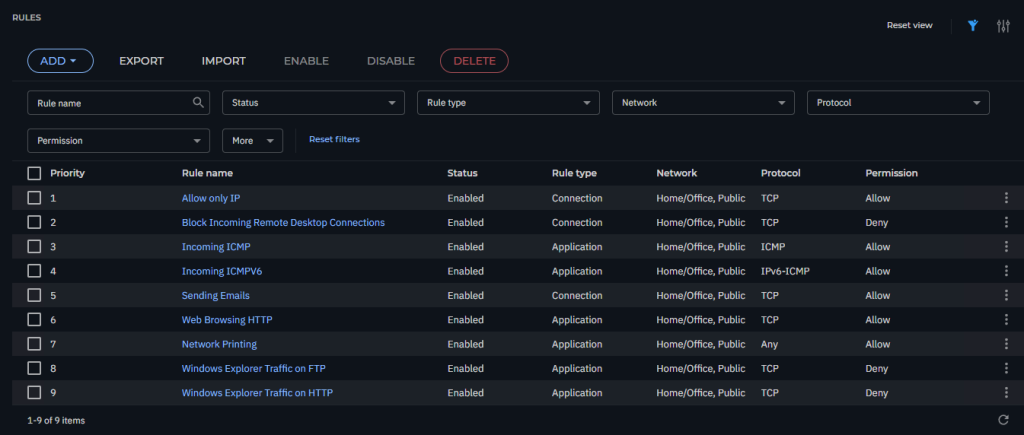
Rules

If you are using Network Printing > Please Enabled and Set Permission as Allow (Rules 7)
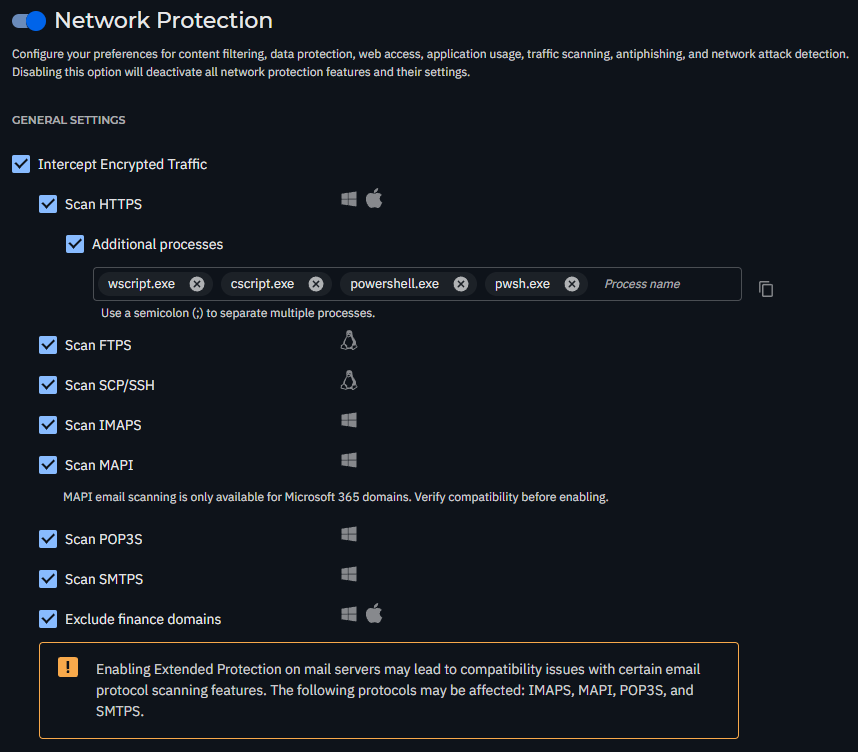
Network Protection

Additional Processes: Add the following processes for scanning: wscript.exe; cscript.exe; powershell.exe; pwsh.exe
Web Protection

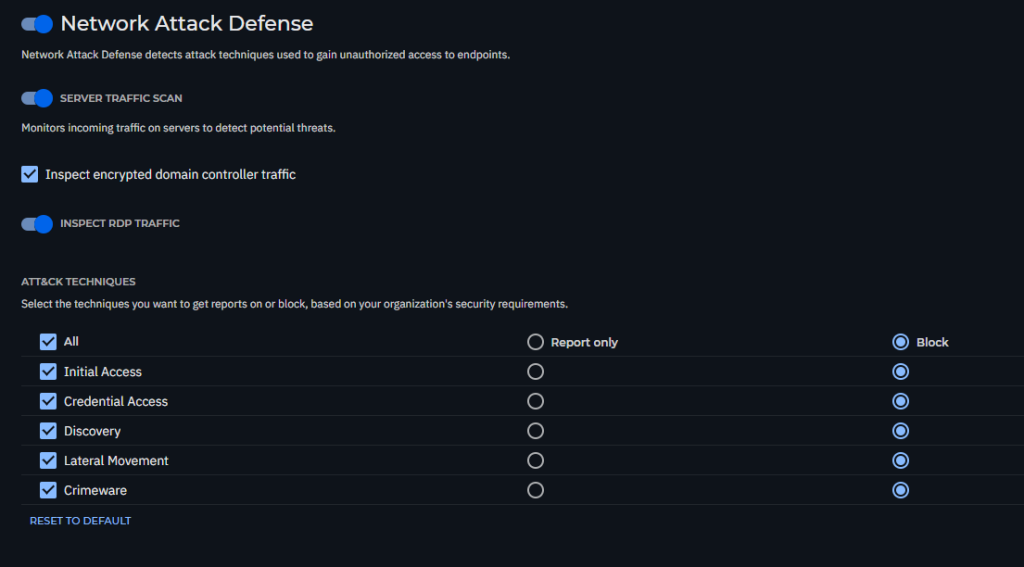
Network Attack Defense

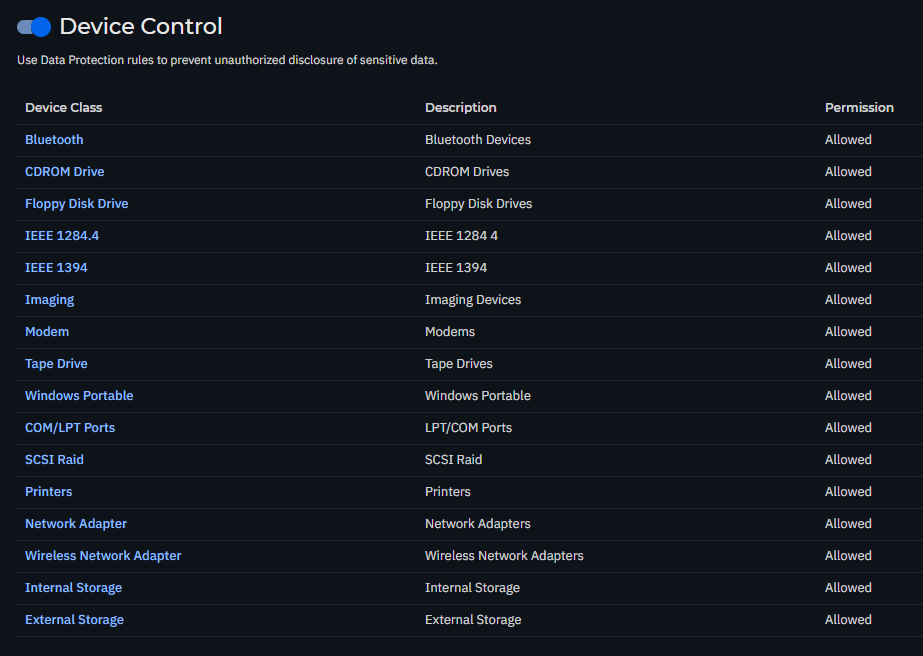
Device Control

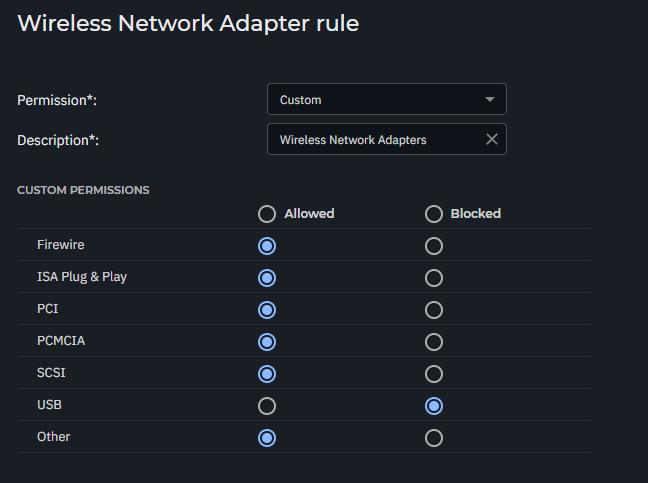
if want to block USB Wifi

if want to block External Storage

Set Windows Portable and External Storage as Block
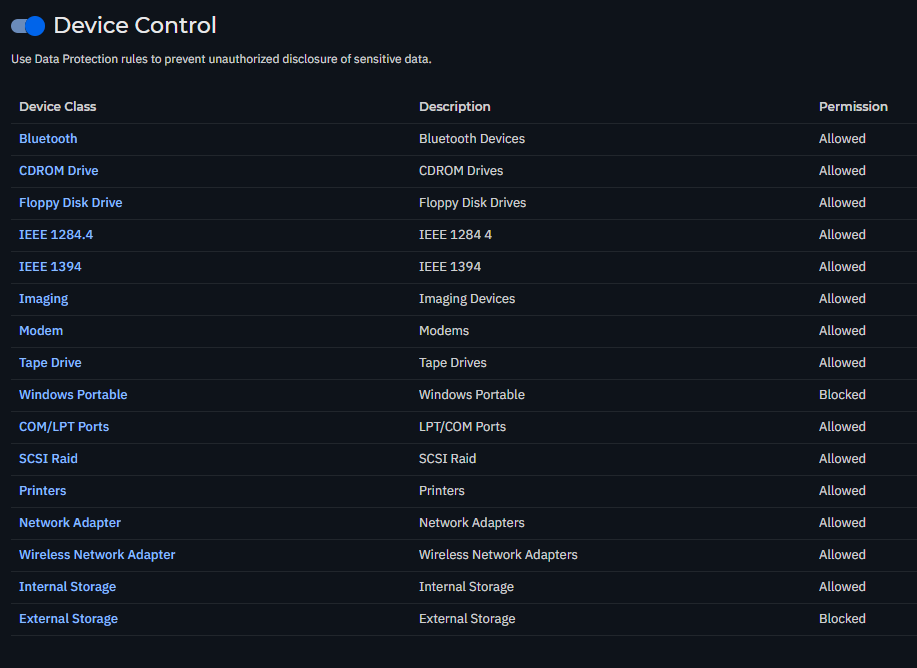
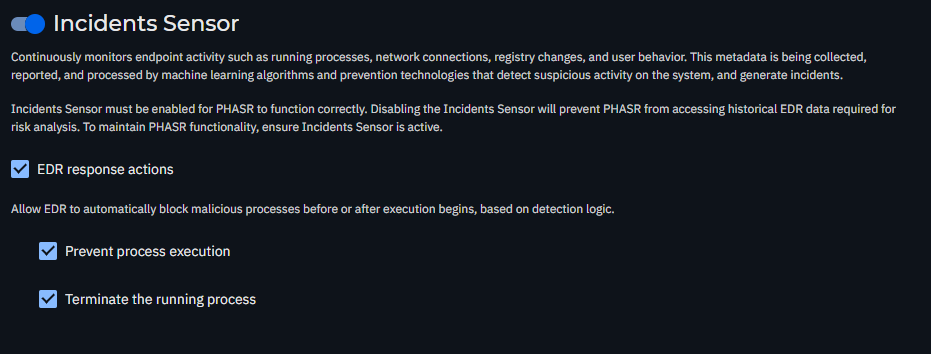
Incidents Sensor

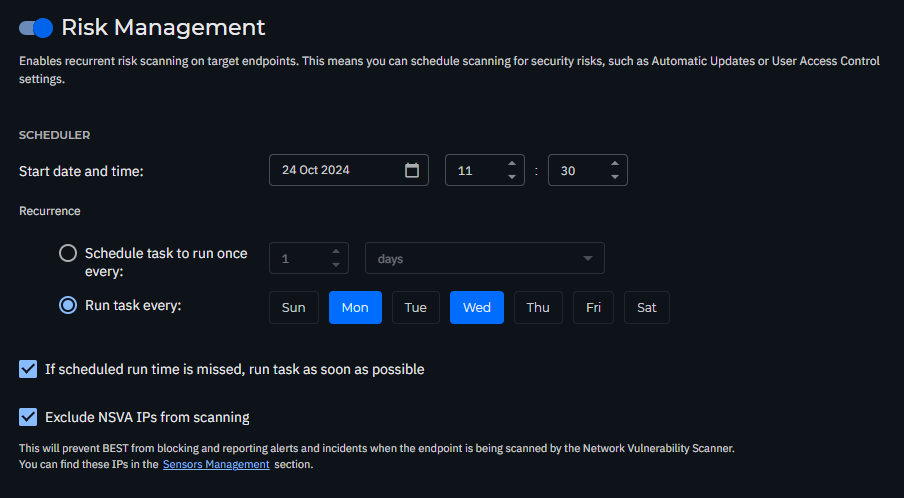
Risk Management

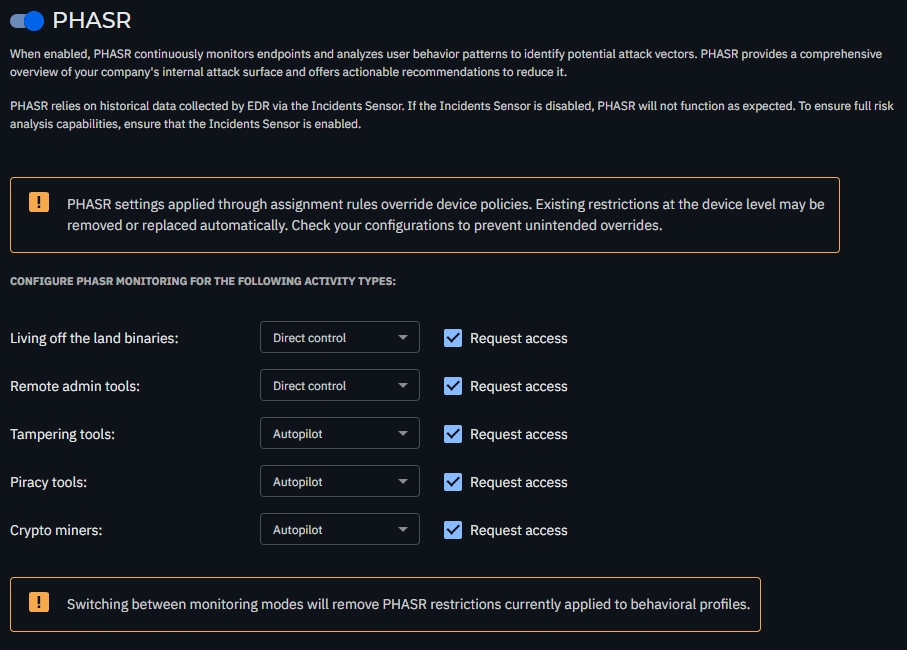
PHASR

Live Search

For MDR

https://www.bitdefender.com/business/support/en/124809-1468110-gravityzone-policy-best-practices-for-mdr-customers.html

Posted in Gravityzone | Tagged , , , , , | Leave a comment

Bitdefender Gravityzone EDR Patch Management

1 You need to install License key by go to

My Company > licensing
https://www.bitdefender.com/business/support/en/77209-295101-licensing—provisioning.html

GravityZone Patch Management is 
Add-on and pay per endpoints

2 Config installation package to include Patch Management (if not it you need to manual install by each endpoint)

https://www.bitdefender.com/business/support/en/77209-157497-install-security-agents—standard-procedure.html#UUID-170effff-9632-b83c-a39e-73ced372a748_section-idm63238366396140

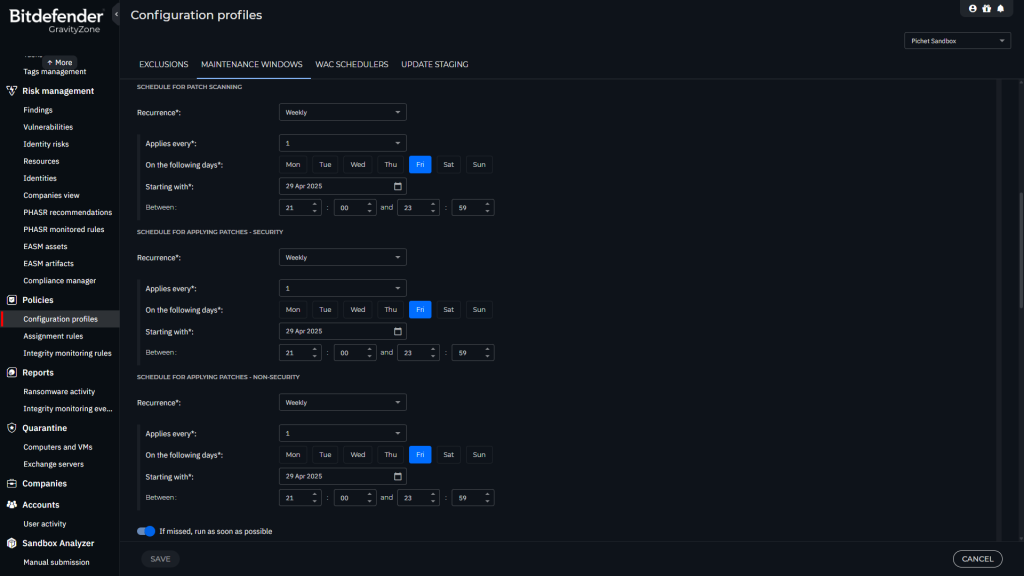
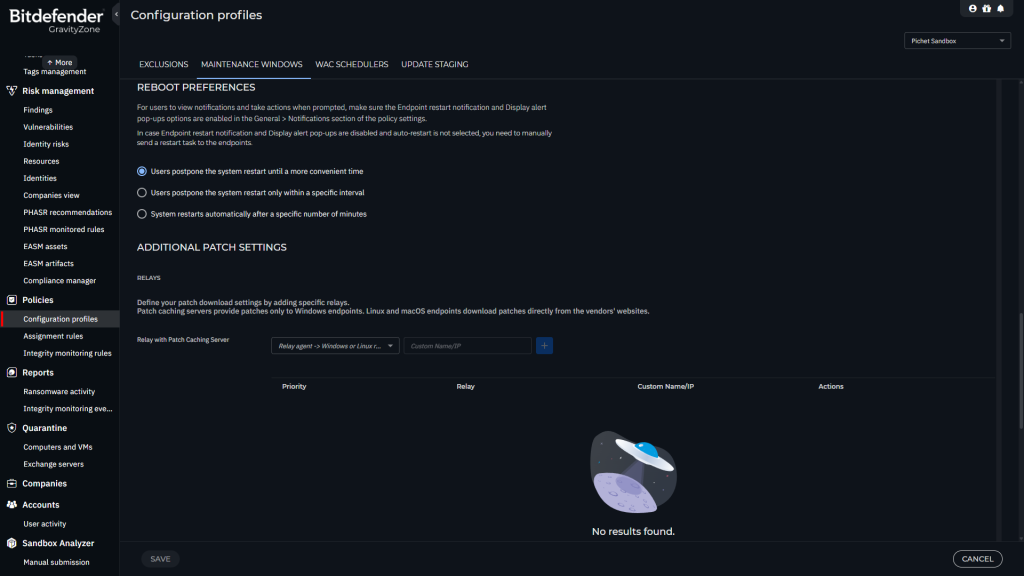
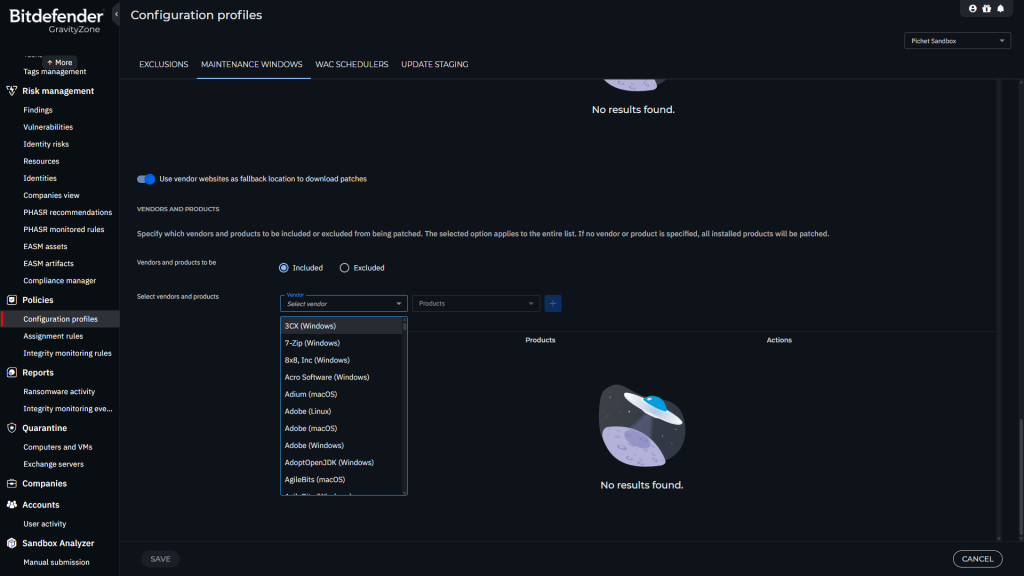
3 Create new maintenance window

https://www.bitdefender.com/business/support/en/77209-376316-patch-management.html
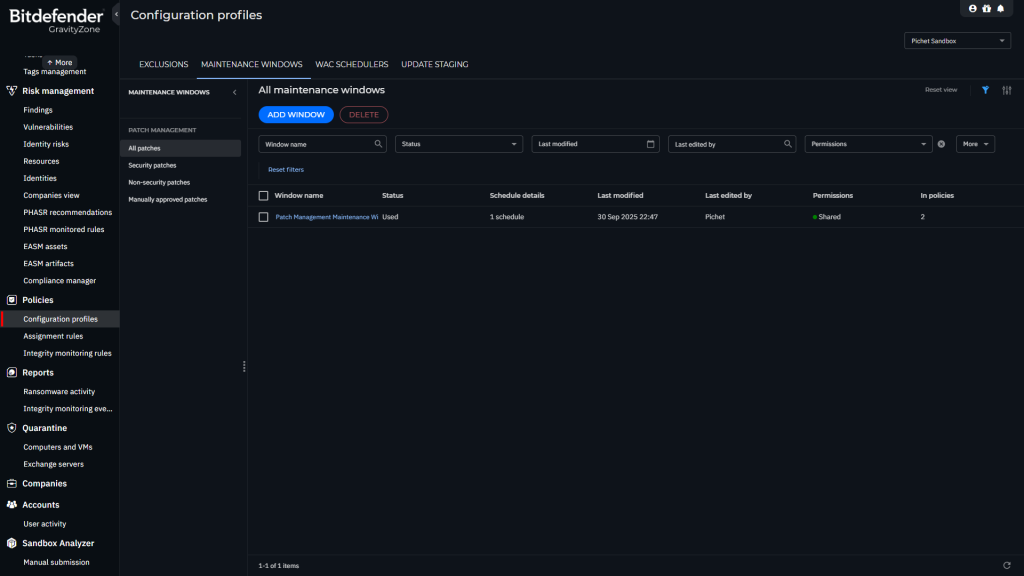
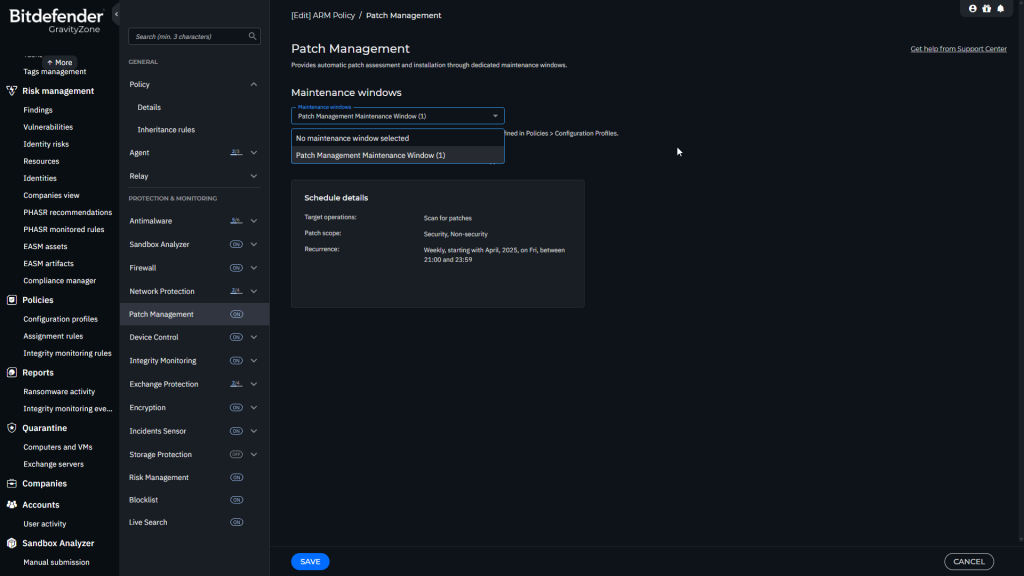
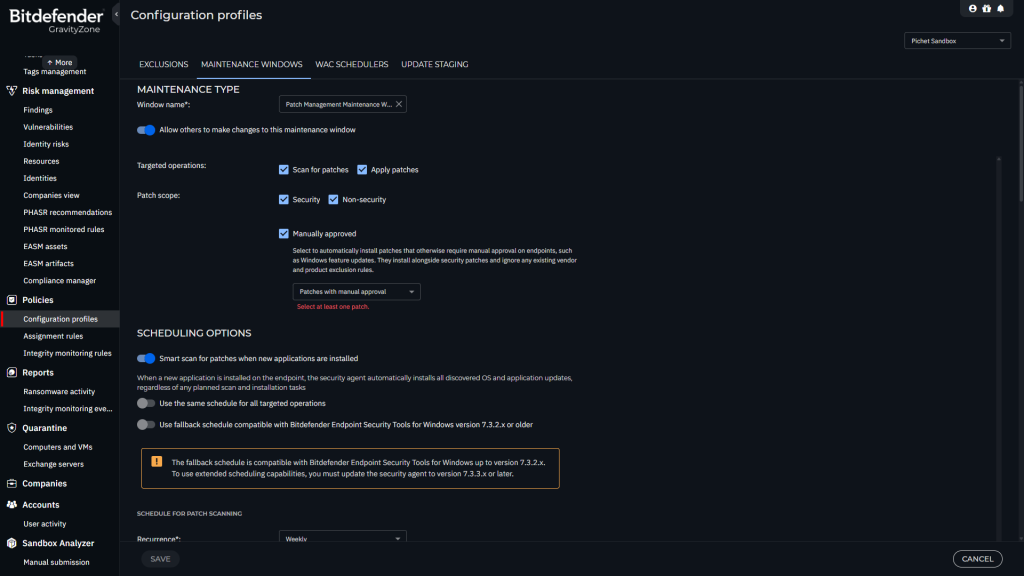
4 Assigning the maintenance window to a policy.

https://www.bitdefender.com/business/support/en/77209-342968-patch-management.html#UUID-c52eb700-05f8-896f-85ff-f9bfff28076d_UUID-7bddb64e-8b87-adcd-c78d-e518b6cfbce0

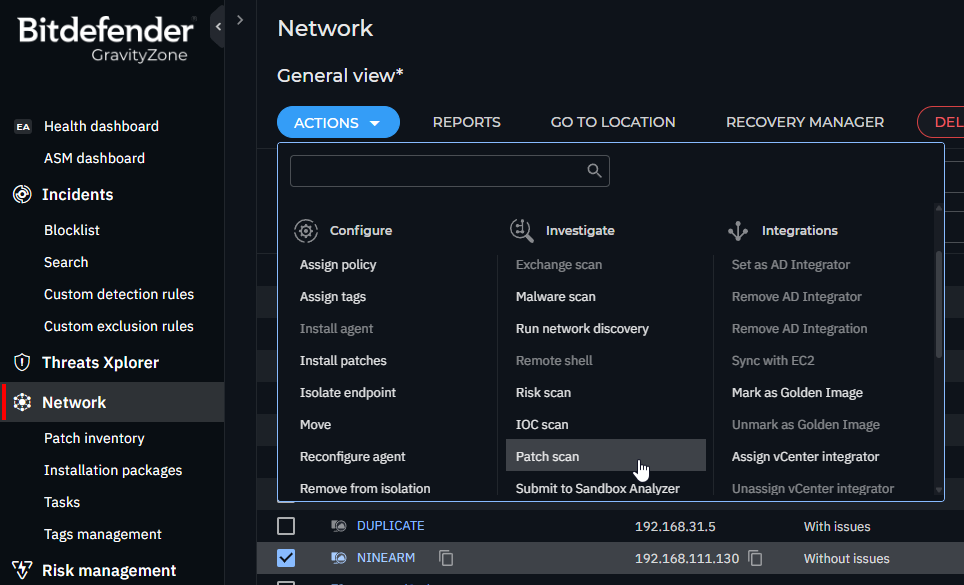
5 Run Patch Scan

  1. Log in to GravityZone Control Center.
  2. Go to the Network page from the left side menu.
  3. Select the target endpoints.
  4. Click the Actions button at the upper side of the table and select Patch scan. A confirmation window will appear.
  5. Click Yes to confirm the scan task.When the task finishes, GravityZone adds in Patch Inventory all patches your software needs. For more details, refer to Patch Inventory.

https://www.bitdefender.com/business/support/en/77209-155238-patch-tasks.html#UUID-cbb6f70c-8ffa-43ed-a31c-be2e103505ae

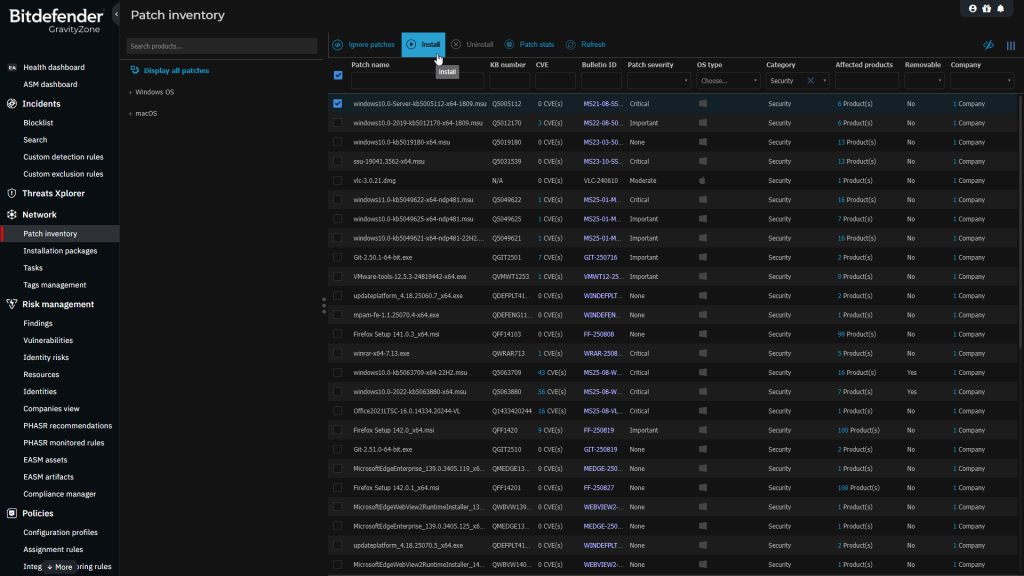
6 Go to Patch Inventory to manage patch  

Manually install or uninstall features

  1. Log in to GravityZone Control Center.
  2. Go to the Network > Patch Inventory page from the left side menu.
  3. Select the patches you want from the list and either install or uninstall them from your managed endpoints.

https://www.bitdefender.com/business/support/en/77209-155237-patch-inventory.html#UUID-39951589-a29d-59fa-ef50-07234110c354_section-idm123369542880172

7 Create Report

  1. Log in to GravityZone Control Center.
  2. Go to the Reports page from the left side menu.
  3. Click the Add button in the upper left side of the page.
  4. Select Network Patch Status.
  5. Under the Select target section, select the endpoints you want to run the report on.
  6. Click Save.

Supported vendors and products

This article provides comprehensive lists of vendors and products that are compatible with Bitdefender Patch Management for Windows, Linux (CentOS, RedHat, and SUSE), and macOS.

The Patch Management module supports a vast set of software products. In GravityZone Control Center you can view only the software products installed in your network, for which GravityZone provides patches.

The lists of supported vendors and products are available in CSV format, grouped by operating system:

Ref Link :

1: https://www.bitdefender.com/business/support/en/77209-376316-patch-management.html
2: https://www.bitdefender.com/business/support/en/77209-376352-bitdefender-patch-management-supported-vendors-and-products.html

Posted in Gravityzone | Tagged , , | Leave a comment

Duplicate Computer name

There is no fully automated built-in feature to remove duplicates solely based on computer name, as GravityZone relies on unique identifiers.


If two endpoints have the same computer name but different HWIDs or MAC addresses, GravityZone treats them as separate entities, each consuming a license seat.

However,

1 You can set up rules for deleting unused or offline endpoints:
    •   Go to Configuration & Network Settings.
    •   Under the Offline machines cleanup section, create rules to automatically delete endpoints that have not connected for a specified period.
    •   This helps clean up stale or duplicate entries that are no longer active.
https://www.bitdefender.com/business/support/en/77211-155208-configuration.html

2 Preparing for duplication a Sysprep-Generalized Windows image with BEST installed.
https://www.bitdefender.com/business/support/en/77209-87466-troubleshooting.html

3 Using Below Script to export duplicate computer name as csv

python getComputerlist.r3.py --api-key "PASTE_YOUR_KEY" --output "./exports/" --debug

Example Duplicate Computer name as csv file

name,fqdn,machineType,operatingSystemVersion,ip,macs,ssid,managedWithBest,lastSeen,loggedInUser
DUPLICATE,duplicate,2,Windows 10 Pro,192.168.31.72,0050569708e3,,True,,
DUPLICATE,duplicate,2,Windows 10 Pro,192.168.31.100,0050569759eb,,True,,
DUPLICATE,duplicate,2,Windows 10 Pro,192.168.31.5,00505697a612,,True,,

https://github.com/darklite404/Bitdefender_Gravityzone/blob/main/getComputerlist.r3.py

3.1 You can get your API Key by https://www.bitdefender.com/business/support/en/77209-125277-public-api.html#UUID-2a74c3b5-6159-831d-4f8a-ca42797ce3b0_section-idm4640169987334432655171029621

To generate API keys:

  1. Log in to https://gravityzone.bitdefender.com/ using an administrator account. Your account must have the following rights: Manage NetworksManage UsersManage Company, and View and analyze data.
  2. Click your username in the upper right side of the console and select My Account:console_my_account_121716_en.png
  3. Go to the API keys section and click the Add button:
    console_my_account_add_API_key121716_en.png
  4. Type in a description for the key and select the APIs you want to enable for use with this key:
  5. Click Generate.NoteA window will be displayed with the newly generated API key and a warning stating that the key is only available for you to read while the window is open. After closing the window you will no longer be able to view the key anywhere in GravityZone.console_my_account_display_API_key_121716_en.png
  6. Click the copy_to_clipboard_121716_en.png button to copy the key to clipboard and save it in a safe location.
  7. Close the API key window.

The new key is added under the API keys section in an obfuscated format along with its description and creation date, and a list of enabled APIs.

console_my_account_add_API_key_result_121716_en.png

Important

By using the API keys, developers can access sensitive information such as packages and inventory. Please do not share or distribute your own generated API keys, in order to prevent the leaking of sensitive information!

Full Code : getComputerlist.r3.py

#!/usr/bin/env python3
r"""
Version: 1.3.0 (2024-06-19)
Editor: Pichet Jarunithi
Fetch Bitdefender GravityZone endpoints, find duplicate endpoint names, and export duplicates to CSV.

What this script does
- Calls GravityZone JSON-RPC API (network) and fetches:
  - getEndpointsList: main list of endpoints.
  - getNetworkInventoryItems: inventory items (may contain nested details).
- Finds endpoints that share the same name (case-insensitive) from getEndpointsList only.
- Exports duplicates to a timestamped CSV.
- Optionally prints all endpoints/inventory to console and/or exports all to CSV(s).
- Auto-updates prerequisites (requests, certifi, packaging) and restarts if updates were applied.
- Supports EU (cloud), US (cloudgz) and AP (cloudap) API endpoints.
- Detailed logging with --debug.

CSV columns (duplicates and "export all")
- name,fqdn,machineType,operatingSystemVersion,ip,macs,ssid,managedWithBest,lastSeen,loggedInUser

Requirements
- Python 3.8+ recommended.
- Outbound HTTPS to GravityZone endpoints.
- Bitdefender GravityZone API key with permissions to query endpoints.
- The script can auto-update required packages (requests, certifi, packaging) and will restart itself when it does.

API key
- Pass with --api-key "YOUR_KEY"
- Or set environment variable BITDEFENDER_API_KEY
  - Windows (PowerShell):  setx BITDEFENDER_API_KEY "YOUR_KEY"
  - Windows (CMD):         setx BITDEFENDER_API_KEY "YOUR_KEY"
  - Linux/macOS (bash):    export BITDEFENDER_API_KEY="YOUR_KEY"
- If neither is provided, the script exits with code 2.

Regions and endpoints
- --region ap:               https://cloudap.gravityzone.bitdefender.com/api/v1.0/jsonrpc/network
- --region eu:               https://cloud.gravityzone.bitdefender.com/api/v1.0/jsonrpc/network
- --region us:               https://cloudgz.gravityzone.bitdefender.com/api/v1.0/jsonrpc/network
- Pick the region that matches your GravityZone console. If unsure, try the default first.

Security note
- Use --insecure only as a last resort when corporate MITM/proxies break TLS validation. It disables certificate verification.

Output files and naming
- Duplicates CSV:
  - Controlled by --output. The script always names files with a timestamp prefix: YYYYMMDD_HHMM.csv.
  - If --output is a directory or ends with a path separator, the file is written inside that directory.
  - If --output is a file path, the parent directory is used; the filename is still timestamped (the literal name is not used).
- Export all CSVs (when --export-all is provided):
  - Writes two files with timestamp in the selected directory:
    - <timestamp>_endpoints.csv
    - <timestamp>_inventory.csv

Logging
- Default: INFO to stdout.
- --debug: verbose diagnostics, including sample payload structures and derived fields.
- --log-file <path>: also writes detailed logs to the specified file.

Exit codes
- 0: success
- 1: runtime error (network/API/other)
- 2: missing API key
- On first run it may auto-update packages and restart.

Command-line options (quick)
- --api-key: API key (or use BITDEFENDER_API_KEY).
- --region: "ap" (alias: "non-eu"), "eu", or "us". Default: "non-eu".
- --output: target directory or path to influence where the timestamped duplicates CSV is written.
- --list-all: print all endpoints and inventory to console.
- --export-all: directory or path (parent directory is used) for writing all endpoints/inventory CSVs.
- --debug: verbose logs.
- --insecure: disable TLS certificate verification (not recommended).
- --log-file: optional log file path.

Examples

Windows (PowerShell)
1) Using environment variable and defaults (non-EU region):
   setx BITDEFENDER_API_KEY "PASTE_YOUR_KEY_HERE"
   python getComputerlist.r3.py

2) Specify region and write outputs to a folder:
   python getComputerlist.r3.py `
     --region eu `
     --output "C:\Exports\" `
     --export-all "C:\Exports\" `
     --log-file "C:\Exports\gz_run.log" `
     --debug

3) Provide API key on the command line:
   python getComputerlist.r3.py --api-key "PASTE_YOUR_KEY" --output "./exports/" --debug
   python getComputerlist.r3.py --api-key "PASTE_YOUR_KEY" --region ap --output "./exports/" --debug

Operational notes
- Duplicate detection is based on name (case-insensitive) from getEndpointsList results only.
- The inventory call is mostly for additional visibility and optional export; it is not used for de-duplication.
- For proxies: requests uses HTTPS_PROXY/HTTP_PROXY environment variables if set.
- If you receive 401/403 errors, verify your API key and GravityZone permissions.
- If you see SSL errors, leave --insecure off unless you fully understand the risk; instead, fix trust store (certifi) or configure your proxy.

Troubleshooting
- "No API key provided": set BITDEFENDER_API_KEY or pass --api-key.
- "API error: ...": re-check region and permissions; confirm endpoint is reachable.
- SSL/TLS validation failure: corporate proxy inspection could be at fault; try updating certifi, adding your proxy’s CA to the system store, or use --insecure as a last resort.
- Timeouts: check network egress, firewall, or corporate proxy rules.

Fields exported (best-effort)
- name, fqdn, machineType, operatingSystemVersion, ip, macs, ssid, managedWithBest, lastSeen, loggedInUser
- Some fields may be empty or derived from nested structures (best effort).

"""
import os
import sys
import csv
import json
import base64
import argparse
import logging
from uuid import uuid4
from typing import List, Dict, Any, Optional
from datetime import datetime

# --- Bootstrap: ensure latest packages and restart if updated ---
def ensure_latest_packages(packages: List[str], logger: logging.Logger) -> None:
    import subprocess
    import importlib
    from importlib import metadata
    from urllib.request import urlopen
    from urllib.error import URLError, HTTPError

    # Ensure 'packaging' exists first (needed for proper version comparison)
    try:
        from packaging.version import parse as vparse  # noqa: F401
    except Exception:
        logger.info("Installing/Updating prerequisite: packaging")
        subprocess.run([sys.executable, "-m", "pip", "install", "--upgrade", "packaging"], check=False, stdout=subprocess.PIPE, stderr=subprocess.PIPE)
        # Try importing again in the same process
        try:
            from packaging.version import parse as vparse  # noqa: F401
        except Exception:
            logger.error("Failed to import 'packaging'. Please install it manually.")
            sys.exit(1)

    from packaging.version import parse as vparse

    updated_any = False
    for pkg in packages:
        try:
            installed_ver = metadata.version(pkg)
        except metadata.PackageNotFoundError:
            installed_ver = None

        latest_ver = None
        try:
            with urlopen(f"https://pypi.org/pypi/{pkg}/json", timeout=15) as resp:
                data = json.load(resp)
                latest_ver = data.get("info", {}).get("version")
        except (URLError, HTTPError, json.JSONDecodeError) as e:
            logger.warning(f"Could not check latest version for {pkg}: {e}")
            continue

        if latest_ver is None:
            continue

        needs_update = installed_ver is None or vparse(installed_ver) < vparse(latest_ver)
        if needs_update:
            logger.info(f"Updating {pkg} from {installed_ver or 'not installed'} to {latest_ver}")
            result = subprocess.run([sys.executable, "-m", "pip", "install", "--upgrade", pkg], stdout=subprocess.PIPE, stderr=subprocess.PIPE, text=True)
            if result.returncode != 0:
                logger.error(f"Failed to update {pkg}: {result.stderr.strip()}")
                continue
            updated_any = True

    if updated_any:
        # Restart the script with same args
        logger.info("Updates applied. Restarting script...")
        os.execv(sys.executable, [sys.executable] + sys.argv)

# --- Argument parsing and logging setup ---
def parse_args() -> argparse.Namespace:
    parser = argparse.ArgumentParser(description="Find duplicate endpoint names via Bitdefender GravityZone API and export details to CSV.")
    parser.add_argument("--api-key", help="Bitdefender API key. If omitted, reads from BITDEFENDER_API_KEY env var.", default=os.getenv("BITDEFENDER_API_KEY"))
    parser.add_argument(
        "--region",
        choices=["ap", "eu", "us", "non-eu"],
        default="non-eu",
        help="API region: ap (alias: non-eu), eu, or us. Default: non-eu (maps to ap)."
    )
    parser.add_argument("--output", default="duplicates_endpoints.csv", help="CSV output filepath")
    parser.add_argument("--debug", action="store_true", help="Enable detailed debug logs")
    parser.add_argument("--insecure", action="store_true", help="Allow insecure HTTPS (disable certificate verification). Not recommended.")
    parser.add_argument("--log-file", default=None, help="Optional path to write detailed logs.")
    parser.add_argument("--list-all", action="store_true", help="Print all endpoints to console.")
    parser.add_argument("--export-all", default=None, help="Optional CSV path to export all endpoints.")
    return parser.parse_args()

def setup_logger(debug: bool, log_file: Optional[str] = None) -> logging.Logger:
    logger = logging.getLogger("gzdup")
    logger.setLevel(logging.DEBUG if debug else logging.INFO)
    if logger.handlers:
        logger.handlers.clear()

    formatter = logging.Formatter("[%(asctime)s] %(levelname)s - %(message)s")

    ch = logging.StreamHandler(sys.stdout)
    ch.setLevel(logging.DEBUG if debug else logging.INFO)
    ch.setFormatter(formatter)
    logger.addHandler(ch)

    if log_file:
        fh = logging.FileHandler(log_file, encoding="utf-8")
        fh.setLevel(logging.DEBUG)
        fh.setFormatter(formatter)
        logger.addHandler(fh)
        logger.info(f"Logging to file: {log_file}")

    return logger

# --- API helpers ---
def get_endpoint_url(region: str) -> str:
    if region == "eu":
        return "https://cloud.gravityzone.bitdefender.com/api/v1.0/jsonrpc/network"
    if region == "us":
        return "https://cloudgz.gravityzone.bitdefender.com/api/v1.0/jsonrpc/network"
    # treat both "ap" and legacy "non-eu" as AP
    return "https://cloudap.gravityzone.bitdefender.com/api/v1.0/jsonrpc/network"

def make_auth_header(api_key: str) -> str:
    token = base64.b64encode(f"{api_key}:".encode("utf-8")).decode("utf-8")
    return f"Basic {token}"

def fetch_all_endpoints(api_url: str, auth_header: str, insecure: bool, logger: logging.Logger, method: str = "getEndpointsList") -> List[Dict[str, Any]]:
    import requests

    headers = {
        "Content-Type": "application/json",
        "Authorization": auth_header,
    }

    items: List[Dict[str, Any]] = []
    page = 1
    per_page = 100

    verify = not insecure
    if not verify:
        try:
            import urllib3
            urllib3.disable_warnings(urllib3.exceptions.InsecureRequestWarning)
        except Exception:
            pass

    while True:
        payload = {
            "jsonrpc": "2.0",
            "method": method,
            "params": {
                "filters": {
                    "depth": {"allItemsRecursively": True}
                },
                "page": page,
                "perPage": per_page,
            },
            "id": str(uuid4()),
        }

        logger.debug(f"Requesting page {page} with perPage {per_page}")
        resp = requests.post(api_url, json=payload, headers=headers, timeout=60, verify=verify)
        resp.raise_for_status()
        data = resp.json()

        if "error" in data:
            raise RuntimeError(f"API error: {data['error']}")

        result = data.get("result", {})
        page_items = result.get("items", [])
        # Extra DEBUG for first page to see structure differences
        if page == 1 and logger.isEnabledFor(logging.DEBUG):
            logger.debug(f"[{method}] result keys: {list(result.keys())}")
            if page_items:
                try:
                    logger.debug(f"[{method}] first item sample: {json.dumps(page_items[0], ensure_ascii=False)[:4000]}")
                except Exception:
                    logger.debug(f"[{method}] first item (repr): {repr(page_items[0])[:4000]}")

        items.extend(page_items)

        total = result.get("total", 0)
        pages_count = result.get("pagesCount", 1)
        logger.debug(f"Fetched {len(page_items)} items (total so far: {len(items)} of {total}); pagesCount={pages_count}")

        if page >= pages_count:
            break
        page += 1

    logger.info(f"Fetched total items with method {method}: {len(items)}")
    return items

# --- Duplicate detection and CSV export ---
def group_duplicates_by_name(items: List[Dict[str, Any]], logger: logging.Logger) -> Dict[str, List[Dict[str, Any]]]:
    groups: Dict[str, List[Dict[str, Any]]] = {}
    for it in items:
        name = (it.get("name") or "").strip()
        if not name:
            continue
        key = name.casefold()
        groups.setdefault(key, []).append(it)
    dupes = {k: v for k, v in groups.items() if len(v) > 1}
    logger.info(f"Duplicate groups found: {len(dupes)}")
    return dupes

def pick_logged_in_user(item: Dict[str, Any]) -> Any:
    for k in ["loggedInUser", "lastLoggedInUser", "loggedUser", "user", "loginUser"]:
        if k in item:
            return item.get(k)
    return ""

def export_duplicates_to_csv(dupes: Dict[str, List[Dict[str, Any]]], output_path: str, logger: logging.Logger) -> None:
    fieldnames = [
        "name",
        "fqdn",
        "machineType",
        "operatingSystemVersion",
        "ip",
        "macs",
        "ssid",
        "managedWithBest",
        "lastSeen",
        "loggedInUser",
    ]
    rows = []
    for key, items in dupes.items():
        for it in items:
            rows.append({
                "name": it.get("name", ""),
                "fqdn": it.get("fqdn", ""),
                "machineType": it.get("machineType", ""),
                "operatingSystemVersion": it.get("operatingSystemVersion", ""),
                "ip": it.get("ip", ""),
                "macs": "|".join(it.get("macs", []) or []),
                "ssid": it.get("ssid", ""),
                "managedWithBest": it.get("managedWithBest", ""),
                "lastSeen": it.get("lastSeen", ""),
                "loggedInUser": pick_logged_in_user(it),
            })

    if not rows:
        logger.info("No duplicates found. CSV will not be created.")
        return

    with open(output_path, "w", encoding="utf-8-sig", newline="") as f:
        writer = csv.DictWriter(f, fieldnames=fieldnames)
        writer.writeheader()
        writer.writerows(rows)

    logger.info(f"Wrote {len(rows)} duplicate endpoint rows to {output_path}")

# Helpers to diagnose and extract fields from nested inventory structures
def _find_first_key_recursive(obj: Any, candidate_keys: List[str], max_depth: int = 4) -> Optional[Any]:
    """Depth-limited recursive search for first existing key in candidate_keys."""
    from collections import deque
    if obj is None:
        return None
    seen = set()
    dq = deque([(obj, 0)])
    cand_set = set(k.casefold() for k in candidate_keys)
    while dq:
        cur, depth = dq.popleft()
        if id(cur) in seen:
            continue
        seen.add(id(cur))
        if isinstance(cur, dict):
            # Direct hit
            for k, v in cur.items():
                if k.casefold() in cand_set and v not in (None, "", []):
                    return v
            # Traverse deeper if allowed
            if depth < max_depth:
                for v in cur.values():
                    dq.append((v, depth + 1))
        elif isinstance(cur, list):
            if depth < max_depth:
                for v in cur:
                    dq.append((v, depth + 1))
    return None

def _normalize_list_or_scalar(value: Any) -> str:
    if value is None:
        return ""
    if isinstance(value, (list, tuple, set)):
        # flatten one level of dicts/values
        flat: List[str] = []
        for x in value:
            if isinstance(x, dict):
                # try common id-like or address-like keys
                flat.append(str(
                    _find_first_key_recursive(x, ["value", "address", "ip", "mac", "id", "name"], max_depth=1) or x
                ))
            else:
                flat.append(str(x))
        return "|".join(map(str, flat))
    if isinstance(value, dict):
        # try some common fields if dict
        return str(_find_first_key_recursive(value, ["value", "address", "ip", "mac", "id", "name"], max_depth=1) or "")
    return str(value)

def extract_common_fields(item: Dict[str, Any]) -> Dict[str, str]:
    """
    Try to extract common fields from either endpoint list or network inventory items.
    Falls back to recursive search for inventory responses where fields are nested.
    """
    # Candidate key lists
    name_keys = ["name", "hostname", "displayName", "computerName", "vmName", "title", "label"]
    fqdn_keys = ["fqdn", "dnsName", "hostFqdn", "fullyQualifiedName", "domainName", "dns", "hostName"]
    os_keys = ["operatingSystemVersion", "osName", "os", "operatingSystem", "platform"]
    ip_keys = ["ip", "ipAddress", "primaryIpAddress", "ipv4", "ipv4Address", "address"]
    mac_keys = ["macs", "mac", "macAddress", "macAddresses"]
    machine_type_keys = ["machineType", "type", "deviceType", "endpointType"]

    # Direct values
    name = item.get("name") or _find_first_key_recursive(item, name_keys)
    fqdn = item.get("fqdn") or _find_first_key_recursive(item, fqdn_keys)
    osv = item.get("operatingSystemVersion") or _find_first_key_recursive(item, os_keys)
    ip = item.get("ip") or _find_first_key_recursive(item, ip_keys)
    macs = item.get("macs") or _find_first_key_recursive(item, mac_keys)
    machine_type = item.get("machineType") or _find_first_key_recursive(item, machine_type_keys)

    return {
        "name": _normalize_list_or_scalar(name),
        "fqdn": _normalize_list_or_scalar(fqdn),
        "machineType": _normalize_list_or_scalar(machine_type),
        "operatingSystemVersion": _normalize_list_or_scalar(osv),
        "ip": _normalize_list_or_scalar(ip),
        "macs": _normalize_list_or_scalar(macs),
    }

def debug_dump_item_structure(method: str, items: List[Dict[str, Any]], logger: logging.Logger, sample: int = 5) -> None:
    """
    Extra diagnostics: show keys, sample JSON, and what we can extract for name/fqdn/ip from nested structures.
    """
    if not logger.isEnabledFor(logging.DEBUG) or not items:
        return
    logger.debug(f"[{method}] diagnostic dump of first {min(sample, len(items))} items")
    for idx, it in enumerate(items[:sample], start=1):
        try:
            logger.debug(f"[{method}] item #{idx} top-level keys: {sorted(list(it.keys()))}")
        except Exception:
            pass
        try:
            logger.debug(f"[{method}] item #{idx} raw (truncated): {json.dumps(it, ensure_ascii=False)[:4000]}")
        except Exception:
            logger.debug(f"[{method}] item #{idx} raw (repr truncated): {repr(it)[:4000]}")
        # Derived fields via recursive extraction
        derived = extract_common_fields(it)
        logger.debug(f"[{method}] item #{idx} derived fields -> name={derived.get('name')!r}, fqdn={derived.get('fqdn')!r}, ip={derived.get('ip')!r}, os={derived.get('operatingSystemVersion')!r}")

def log_all_endpoints(items: List[Dict[str, Any]], logger: logging.Logger, level: int = logging.INFO) -> None:
    for it in items:
        # Use recursive extraction to surface fields even for inventory items
        fields = extract_common_fields(it)
        logger.log(
            level,
            "Endpoint: name=%s, fqdn=%s, machineType=%s, os=%s, ip=%s, macs=%s, ssid=%s, managedWithBest=%s, lastSeen=%s, loggedInUser=%s",
            fields.get("name", "") or it.get("name", ""),
            fields.get("fqdn", "") or it.get("fqdn", ""),
            fields.get("machineType", "") or it.get("machineType", ""),
            fields.get("operatingSystemVersion", "") or it.get("operatingSystemVersion", ""),
            fields.get("ip", "") or it.get("ip", ""),
            fields.get("macs", "") or "|".join(it.get("macs", []) or []),
            it.get("ssid", ""),
            it.get("managedWithBest", ""),
            it.get("lastSeen", ""),
            pick_logged_in_user(it),
        )

def export_all_to_csv(items: List[Dict[str, Any]], output_path: str, logger: logging.Logger) -> None:
    fieldnames = [
        "name",
        "fqdn",
        "machineType",
        "operatingSystemVersion",
        "ip",
        "macs",
        "ssid",
        "managedWithBest",
        "lastSeen",
        "loggedInUser",
    ]
    with open(output_path, "w", encoding="utf-8-sig", newline="") as f:
        writer = csv.DictWriter(f, fieldnames=fieldnames)
        writer.writeheader()
        for it in items:
            writer.writerow({
                "name": it.get("name", ""),
                "fqdn": it.get("fqdn", ""),
                "machineType": it.get("machineType", ""),
                "operatingSystemVersion": it.get("operatingSystemVersion", ""),
                "ip": it.get("ip", ""),
                "macs": "|".join(it.get("macs", []) or []),
                "ssid": it.get("ssid", ""),
                "managedWithBest": it.get("managedWithBest", ""),
                "lastSeen": it.get("lastSeen", ""),
                "loggedInUser": pick_logged_in_user(it),
            })
    logger.info(f"Wrote all {len(items)} endpoints to {output_path}")

def resolve_timestamped_csv_path(preferred: Optional[str], suffix: Optional[str], logger: logging.Logger) -> str:
    ts = datetime.now().strftime("%Y%m%d_%H%M")
    filename = f"{ts}{suffix or ''}.csv"
    dirpath: Optional[str] = None

    if preferred:
        if preferred.endswith(os.sep) or os.path.isdir(preferred):
            dirpath = preferred
        else:
            parent = os.path.dirname(preferred)
            if parent:
                dirpath = parent

    if not dirpath:
        dirpath = os.getcwd()

    path = os.path.join(dirpath, filename)
    logger.debug(f"Resolved CSV path: {path}")
    return path

# --- Main ---
def main() -> None:
    args = parse_args()
    logger = setup_logger(args.debug, args.log_file)

    if not args.api_key:
        logger.error("No API key provided. Use --api-key or set BITDEFENDER_API_KEY environment variable.")
        sys.exit(2)

    ensure_latest_packages(["requests", "certifi", "packaging"], logger)

    api_url = get_endpoint_url(args.region)
    logger.debug(f"Using API endpoint: {api_url} (region: {args.region})")

    auth_header = make_auth_header(args.api_key)
    logger.debug("Authorization header prepared.")

    try:
        logger.info("Scanning with method: getEndpointsList")
        items_endpoints = fetch_all_endpoints(api_url, auth_header, args.insecure, logger, method="getEndpointsList")

        logger.info("Scanning with method: getNetworkInventoryItems")
        items_inventory = fetch_all_endpoints(api_url, auth_header, args.insecure, logger, method="getNetworkInventoryItems")

        # Extra diagnostics: dump item structure when --debug
        if args.debug:
            debug_dump_item_structure("getEndpointsList", items_endpoints, logger, sample=3)
            debug_dump_item_structure("getNetworkInventoryItems", items_inventory, logger, sample=5)

        if args.list_all:
            logger.info("Endpoints (getEndpointsList):")
            log_all_endpoints(items_endpoints, logger, level=logging.INFO)
            logger.info("Inventory (getNetworkInventoryItems):")
            log_all_endpoints(items_inventory, logger, level=logging.INFO)
        elif args.debug:
            logger.debug("Endpoints (getEndpointsList):")
            log_all_endpoints(items_endpoints, logger, level=logging.DEBUG)
            logger.debug("Inventory (getNetworkInventoryItems):")
            log_all_endpoints(items_inventory, logger, level=logging.DEBUG)

        duplicates_out = resolve_timestamped_csv_path(args.output, None, logger)

        if args.export_all is not None:
            all_out_endpoints = resolve_timestamped_csv_path(args.export_all, "_endpoints", logger)
            all_out_inventory = resolve_timestamped_csv_path(args.export_all, "_inventory", logger)
            export_all_to_csv(items_endpoints, all_out_endpoints, logger)
            export_all_to_csv(items_inventory, all_out_inventory, logger)

        dupes = group_duplicates_by_name(items_endpoints, logger)
        export_duplicates_to_csv(dupes, duplicates_out, logger)

    except Exception as e:
        logger.error(f"Failure: {e}")
        sys.exit(1)

if __name__ == "__main__":
    main()


Remarks

  • IF you cannot delete duplicate computer, We assume that the frequent hwid changes happen due to corruptions of WMI database
    • We recommend recreating the WMI database and monitor wheher the issue persists.
      • Steps:
        1. Stop WMI service
          services.msc -> select ‘Windows Management Service’ -> Stop
        2. Rename WMI DB folder (from c:\Windows\System32\wbem\Repository\ to c:\Windows\System32\wbem\Repository.old)
        3. Start WMI service
          services.msc -> select ‘Windows Management Service’ -> Start
        4. Restart machine
Posted in Gravityzone | Tagged | Leave a comment